


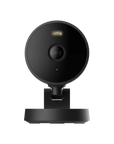
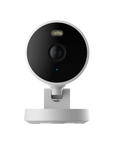




Camera G100
Monitor suitable indoor and outdoor spaces with 2K video, local person detection, infrared black-and-white night vision and spotlight colour night vision.
Connect over 2.4GHz Wi-Fi, record to an optional microSD card up to 512GB, and use supported RTSP or NAS functions. The G100 is not a Zigbee or Thread hub. Install within its -10 to 40°C operating range.
Apple HomeKit video is limited to 1080p. Optional HomeGuardian cloud features depend on the plan and availability in Kuwait.
 Aqara
Aqara
 Apple Home
 Google Home
 Alexa
Alexa
 SmartThings

Camera G100
2K resolution security camera with spotlight color and lR night vision


Darkness Demands Options. You Get Two.
Choose infrared night vision for a clear black-and-white image without visible white light, or enable the spotlight for colour night vision. Select the mode that suits the location and lighting.


Secure Local and Cloud Storage

Local storage with a microSD card (up to 512 GB, not included) allows you to record continuously and review footage at your convenience.

For added peace of mind and increased storage capacity, seamlessly back up your recordings to the cloud with end-to-end encryption.
* You may choose the free cloud storage or advanced cloud storage subject to the HomeGuardian plan available in your region.


Works with Your Favorite Platforms
Stream video and use two-way talk with Apple HomeKit Secure Video, Google Home, Alexa, SmartThings, and more. Supports RTSP for easy integration with Home Assistant, Frigate, Blue Iris, and similar systems.
Note: HomeKit Secure Video supports up to 1080p resolution.
Indoor and Outdoor Monitoring Within Operating Limits
The camera is rated IP65 for dust and water resistance. Install it with suitable power and protection within its operating range of -10 to 40°C. Exposed locations in Kuwait may exceed this temperature range.


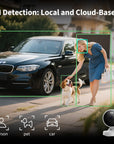
Smart AI Detection, Local & Cloud
Get smarter alerts with dual-layer AI.
- Local AI: Detects people and filters out false alarms—no subscription needed.
- Cloud AI: With the HomeGuardian plan, unlock advanced detection for pets, vehicles, packages, and faces.
Check HomeGuardian availability and trial terms for your account and region.
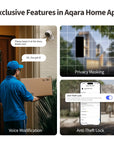
Exclusive Features in Aqara Home App

For more privacy, you can mask out parts of the image so that they will be completely blocked while recording.

In two-way conversations, you can modify your voice for protection and privacy.

Once enabled,the camera will only work on your Aqara account to prevent device theft.
Multiple Installation Methods to Suit Any Space


Automation Example


Specifications


FAQ
What is the camera's IP rating?
This product supports an IP65 waterproof and dustproof rating.
What power adapter specifications are required for the camera?
This product requires a power adapter with DC 5V/1A output.
Can users purchase power cables to power the camera?
Yes, this product uses a standard USB-C TO USB-C power cable for power supply. Users can choose a power cable of the same specification with an appropriate length according to the installation location. The maximum recommended length should not exceed 5m.
Can you turn on the white light while infrared black-and-white night vision is enabled?
No, the infrared black-and-white night vision mode and the full-color night vision mode with white light are mutually exclusive. Only one night vision mode can be used at a time.
What is the effective fill light distance of white light?
The effective fill light distance of the white light at night is 5 meters, and it is capable of recognizing human figures.
Can the camera connect to 5G Wi-Fi?
This product only supports connection to 2.4GHz Wi-Fi and supports 2.4GHz Wi-Fi 6 protocol
Does the camera have the ability to connect to Zigbee and Thread sub-devices?
This product does not have Hub functionality and does not support connecting to sub-devices.
What is the maximum capacity of the MicroSD card supported by the camera?
This product supports MicroSD cards with a maximum capacity of 512GB.
Does the camera support NAS and RTSP functions?
This product supports NAS and RTSP functions.
What is the purpose of the cable concealment hole on the base?
When wall-mounting or ceiling-mounting this product, if you wish to hide the power cable, you can use a tool to pry open the cable concealment cover and thread the power cable through the hole to hide it within the wall or ceiling. Please ensure the camera is connected to the network before installation.
Why is the camera picture always blurry after connecting to the Apple Home App?
After the camera is connected to the Apple Home App, it will automatically adapt the picture clarity and frame rate according to the current network connection quality. When the network connection is poor, the picture quality and frame rate will automatically decrease; when the network recovers, the picture quality and frame rate will automatically improve. So when the picture quality is poor, you need to improve the network connection of the camera
Why isn't the maximum resolution of the camera clarity 1296p?
1. After connecting the camera to the Apple Home app, the maximum resolution is restricted to 1080p due to limitations on the HomeKit platform. 2. If the camera is only connected to the Aqara Home app, it can support up to 1296p resolution. However, once it is also added to HomeKit, the resolution in the Aqara Home app will be restricted to 1080p as well, due to hardware encoding limitations.
What are the specifications required for the new power cord if the installation position requires a longer power cord?
1. After replacing with a longer power cord, the recommended 5V/1A power supply may experience voltage drop causing insufficient power, recommend changing the power supply specification to 5V/2A 2. The maximum recommended power cord length should not exceed 5 meters 3. If the USB-C connector (plastic part) of the replacement power cord is smaller than the original power cord, the original waterproof silicone cover may pose a waterproofing risk and additional protective measures are needed