


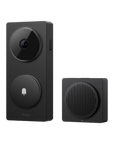




Doorbell Camera Hub G410
Grab a bundle & explore our kits!
Redefine your front door security with the Aqara Doorbell Camera Hub G410. More than just a video doorbell, the G410 is a powerful, all-in-one command center for your entire smart home. Combining a 2K camera with a built-in multi-protocol hub, it delivers unparalleled security, intelligence, and integration.
Key Features:
-
The Hub for Your Entire Smart Home
Eliminate clutter and complexity. The G410 is the only doorbell you need, acting as a powerful Zigbee 3.0 hub for your Aqara devices and a Thread Border Router with a Matter controller. This allows it to bridge your Aqara ecosystem to Matter and seamlessly integrate third-party Matter devices, unifying your smart home like never before. -
Smarter Detection with mmWave Radar
Stop annoying false alerts. Unlike traditional PIR sensors that are easily fooled by falling leaves or shadows, the G410 features advanced mmWave radar. It provides hyper-accurate presence and lingering detection, ensuring you only get notified when someone is actually there, while also optimizing battery life. -
Subscription-Free Face Recognition & Alerts
Your privacy is paramount. The G410 processes facial recognition locally on the device, triggering personalized automations and alerts without ever needing to upload your data to the cloud. Enjoy advanced AI features without recurring fees or privacy concerns. Plus, a built-in tamper alarm will sound if anyone tries to forcibly remove the device. -
Unrivaled Ecosystem Support
The G410 works with the platforms you love. It offers full support for Apple HomeKit Secure Video, with end-to-end encrypted storage using your iCloud plan. Stream directly to Google Home and Amazon Alexa displays, and enjoy advanced bridging to Home Assistant for local control and automations. -
See the Whole Picture in 2K Clarity
Capture every detail with stunning 2K video resolution. The camera's wide 175° field of view and 4:3 aspect ratio are designed to show you everything on your porch, from a visitor's face to packages on the ground. The large f/1.8 aperture ensures excellent image quality, even in low-light conditions. -
Flexible Power & Secure Storage
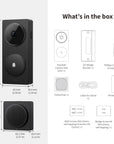
Install it your way. Power the G410 with the included six AA batteries for up to 5 months of life or hardwire it to your existing doorbell wiring for continuous power. Your recordings are protected with a triple-layer storage system: save footage 24/7 to an indoor microSD card (up to 512GB, sold separately) to prevent theft, back up to your own NAS, or use the end-to-end encrypted HomeGuardian cloud service (subject to regional availability in Kuwait).
 Aqara
Aqara
 Apple Home
 Alexa
Alexa
 Google Home
 SmartThings

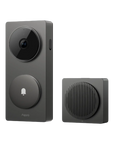
Doorbell Camera Hub G410
A doorbell camera hub that supports local automations and major smart home ecosystems.


On-Device Face Recognition
Recognizes familiar faces and alerts you when someone stays at your door. Tag family members in the app to trigger home scenes automatically—or get notified if a stranger lingers.


Answer Your Door from Anywhere
Level up your front door with the G410 Doorbell Camera. Always be able to check live video stream from your front door, and interact in real time from wherever you are.
Two-Way Audio
Engage in live, two-way conversations with guests and delivery personnel right from your phone or smart displays, whether you're home or away.

Highly Accurate Alerts
Using the built-in mmWave radar presence sensor, the G410 accurately detects presence and lingering to to keep you informed of doorstep activity.


Chime-Hub Included
The indoor chime-hub features an adjustable 95 dB speaker and supports default rings or your own custom audio files, never miss a visitor! Connected via a USB-C port for flexible indoor placement.
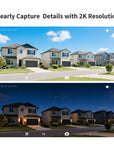
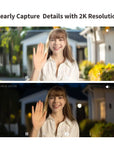
Clearly Capture Details with 2K Resolution
Get the full picture with a 175° wide-angle lens and 4:3 aspect ratio. 2K resolution ensures that vital details are never missed, easly identifying faces and packages. Plus, with infrared night vision, you'll enjoy sharp clarity even in low-light conditions.

Compatible with Leading Smart Home Ecosystems
- Full HomeKit Secure Video Support
- Integrate Locally with Home Assistant
- Stream to Your Favorite Smart Displays
Note:
* HomeKit Secure Video resolution is limited by platform support.
* RTSP is only available with a wired connection.


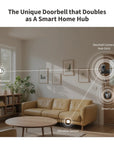
The Unique Doorbell that Doubles as A Smart Home Hub
The G410 combines a video doorbell, an Aqara Zigbee hub and a Matter controller for supported devices.
It can also act as a Thread border router to connect Thread-based smart devices to your home network.
Flexible Control from the Aqara Home App

For more privacy, you can mask out parts of the image so that they will be completely blocked while recording.

In two-way conversations, you can modify your voice for more protection and privacy.
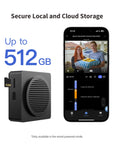
Local and Cloud Storage

Save recorded videos on a microSD card (up to 512 GB, not included), allowing 24/7 continuous recording*.

Supported storage options can back recordings up to NAS when available in firmware and correctly configured on the network.

A HomeGuardian subscription can provide cloud storage where available. Check account, region, encryption and retention terms in the app.
*Only available in the wired-powered mode.

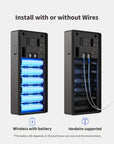
Wired or Wireless Installation

Wireless with Battery
Enjoy effortless installation and placement flexibility anywhere within Wi-Fi range; its replaceable batteries provide power for up to 5months.

Hardwire Supported
Use a compatible external supply for continuous power and 24/7 recording: 12–24V AC 0.2A 50/60Hz, or 12–24V DC 0.5A. A qualified electrician should install it according to the manual.

lF home owner's face detected
THEN play a pre-recorded voice message: "Hey, welcome home!"

lF home owner's face detected
THEN play a pre-recorded voice message: "Hey, welcome home!"

lF someone is detected by the doorbell
THEN see who it is and, if needed, open the lock with a single click

lF someone is detected by the doorbell
THEN see who it is and, if needed, open the lock with a single click
Specifications


FAQ
Why is my battery life so short?
Battery life issues may have several causes/solutions 1. After connecting the doorbell to the Aqara Home app or the Apple Home app, please avoid keeping the app open for extended periods. If not in use, close the app or let it run in the background. 2. The farther the detection distance is set in the loitering detection feature, the more likely the doorbell will be triggered by nearby activity. Please adjust the detection range according to your actual needs. 3. Mixing old and new batteries, using non-LR6 type batteries, or batteries that do not output 1.5V can all reduce battery life. 4. If the distance between the doorbell and the repeater/chime exceeds 10 meters (the maximum connection range), or if there are many physical obstructions or sources of wireless interference in the environment, communication quality may degrade, leading to increased power consumption and shorter battery life.
How does the power saving mode increase the battery life of the doorbell?
In "power saving mode", the proximity activation sensor will be turned off, and the doorbell can only be activated by pressing the bell or remotely viewing the doorbell video from the App. The number of times the doorbell is activated will decrease, which will significantly extend the battery life of the doorbell.
Why can't I see any visitors in the recorded videos?
If the loitering time setting in loitering detection is too long, the doorbell may start recording only after the visitor has already left the camera's field of view. Please reduce the loitering time setting.
What types of batteries does the doorbell support?
1. The doorbell supports AA batteries or rechargeable lithium batteries with a discharge voltage of 1.5V. Using NiMH batteries with an output voltage of 1.2V will result in inaccurate power calculations. LR6 type alkaline AA batteries are recommended. 2. When replacing batteries, it is recommended to replace all 6 batteries with new ones of the same model at once. Mixing old and new batteries or different types of batteries will reduce battery life.
Why can't my doorbell trigger activate recording via the activate sensor?
1. Check if Power Saving Mode is enabled. In this mode, the doorbell only activates and records when the button is pressed or when video is accessed via the app. Switch to Normal Mode to enable the proximity activation sensor. 2. Make sure the cloud recording switch in the loitering detection settings is turned on. 3. Check the detection interval setting in loitering detection. If the interval is set too long, it may delay the triggering of the next event.
When using a DC power supply as an external power supply, how do you distinguish the positive and negative poles on the terminal?
When the external power supply is from a DC. power supply, the terminals do not distinguish between positive and negative poles, and both terminals can be connected to the positive or negative pole.
Why does the doorbell image freeze, skip frames, and intercom become choppy?
Please check whether the installation distance between the doorbell and the repeater/chime exceeds the allowable range, or if there are other sources of Wi-Fi interference operating on the same frequency. You can improve the connection by adjusting the repeater/chime installation location or changing the router’s Wi-Fi channel.
Why does the indicator light still turn on when the doorbell is activated, even after the indicator light has been turned off?
Please make sure the indicator light switch is off. If the doorbell is connected to HomeKit, please make sure to turn off the indicator light switch in Apple's "Home" app to ensure synchronization.
What protocol does the doorbell use for wireless connection? How to bind sub-devices?
The doorbell links to the indoor unit over Wi-Fi, and the indoor unit links to the router over Wi-Fi. The indoor unit acts as a hub for supported Aqara Zigbee devices, a Matter controller and a Thread border router. Supported device types depend on firmware.
Is the doorbell waterproof? In what outdoor environments can it be installed?
The doorbell is not fully waterproof by design. It is recommended to install it at an entrance with an eave or porch for protection. Alternatively, you can use the official Aqara silicone waterproof cover, which helps reduce the risk of rainwater splashing onto and wetting the doorbell.
Why can't I remove the back panel fastening screws when I disassemble the doorbell to replace the battery?
To prevent the fastening screws from falling off and being lost when disassembling the doorbell, the back panel fastening screws are designed to be unable to be removed. Please do not pull out the screws forcibly.
What formats can custom audios be uploaded in? What is the maximum number of audios that can be uploaded?
Custom audios only support uploading audio files in MP3 format. The maximum size of a single file is 2M. Each device only supports uploading a maximum of 5 custom audios.
Do all doorbell-related automations need to be performed through the cloud?
Doorbell-related automations can be executed locally. For example, if you set the doorbell to detect a ring and then play a ringtone on the repeater, this automation will be a local automation.
Why can't my doorbell recognize my face? What are the factors that affect face detection?
1. The face detection function is disabled by default. You can go to the device settings page of the App - More settings - Detection settings - Face detection, to enable the function and set related parameters; 2. The face detection sensitivity is medium by default. If the face cannot be detected, please adjust the sensitivity to high 3. Please check whether the lighting conditions in the doorbell's installation environment are adequate. If there is too much backlight or insufficient light, the face detection rate will be reduced. Additionally, face detection accuracy may also be reduced when using infrared night vision at night.
Does the doorbell support package detection?
Package detection is available through HomeKit Secure Video with a compatible Apple home hub, iCloud+ plan and settings. Detection options in Aqara Home may vary by version; check the available settings.
Do the high temperature alarm and low temperature alarm detect the device temperature or the ambient temperature? What is the significance?
The high and low temperature alarm detects the ambient temperature at the doorbell installation location. The high and low temperature alarm will issue an early warning before the battery fails due to the influence of excessive ambient temperature.
Can the doorbell work without connecting to a repeater? Can the user unbind doorbell and the repeater and still use the device?
The doorbell relies on the Wi-Fi signal forwarded by the repeater to connect, and is bound one-to-one with the repeater before leaving the factory. Users cannot unbind it by themselves, nor can they remove the repeater for use.
What is the distance and angle detected by the proximity activation sensor?
The proximity activation sensor can detect targets within a range of 1-5 meters. Users can adjust it according to actual needs. The horizontal detection angle of the proximity activation sensor is 100° and the vertical detection angle is 100°.
How does the approach trigger feature work in loitering detection?
Approach trigger refers to when a target produces a vertical displacement approaching the doorbell within the doorbell's wake sensor detection range, which will trigger the doorbell to wake up. For example, walking directly toward the doorbell in front of it, or approaching the doorbell from the side at a certain angle, the displacement needs to be greater than a certain threshold (the judgment threshold for approaching the doorbell at different distances varies); if moving parallel to the front of the doorbell (vertical displacement is 0), it will not wake up the doorbell. After enabling the approach trigger, it can filter out most ineffective targets crossing in front of the doorbell, reduce the number of doorbell wake-ups, and enhance the doorbell's battery life.
Why is the image always blurry after connecting the camera to the Apple Home App?
After the camera is connected to the Apple Home app, the video resolution and frame rate will automatically adjust based on the current network quality. When the network is poor, both resolution and frame rate will be lowered. Once the network connection improves, the video quality and frame rate will automatically increase. Therefore, if the image appears poor, improving the camera's network connection is recommended.
Why isn't the highest resolution for doorbell video clarity 1536p?
1. After connecting the doorbell to the Apple Home app, the maximum resolution is restricted to 1600×1200p due to current limitations of the HomeKit platform. 2. If the doorbell is only connected to the Aqara Home app, it can support up to 1536p resolution. However, once it is also added to HomeKit, the resolution in the Aqara Home app will be restricted to 1600×1200p as well, due to hardware encoding limitations.
What are the requirements for the doorbell installation environment?
1. The doorbell only supports IPX3 waterproof rating and should not be installed in locations where it may be exposed to rain. Even with Aqara's official silicone protective cover, it only prevents rain from entering the doorbell through the front button area and is not completely waterproof. 2. Please avoid installing the doorbell in a position where sunlight may directly hit the lens, as this may accelerate aging of the imaging components, affect image quality, or increase power consumption and affect video connection stability.