


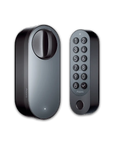
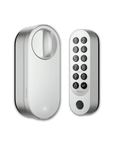


Smart Lock U200
Grab a bundle & explore our kits!
Native Matter Support Over Thread
The Aqara Smart Lock U200 is fully compatible with the Matter platform, ensuring seamless integration with leading smart home ecosystems such as Apple HomeKit, Google Home, Amazon Alexa, Samsung SmartThings, and the Aqara Home app. By leveraging the Aqara Hub M3, users can enable remote unlocking and create custom automations with other Aqara devices. Please note that the U200 is exclusively compatible with the Aqara M3 hub for optimal performance.
Apple Home Key & Various Unlocking Methods
Unlock your door effortlessly with a variety of methods including Apple Home Keys, fingerprint recognition, password entry, and NFC (NFC device not included). The U200 also supports control via the Aqara Home app using Bluetooth or Thread for remote access. Additionally, generate temporary passwords for guests and utilize mechanical keys for emergency access, providing flexible and secure entry options tailored to your needs.
Quiet Unlock Mode & Auto Lock
Enjoy a noiseless entry with the Quiet Unlock Mode, which allows the door to unlock smoothly without loud sounds. Activated directly from the keypad, this feature operates independently of any hub or Thread border router. The built-in gyroscope detects when the door is closed and automatically locks it, ensuring your home remains secure. This auto-lock feature can be managed through the Aqara Home app, provided the firmware is up to date.
Rechargeable Battery & Multi-Power Options
The U200 is powered by rechargeable Li-Ion batteries offering up to 6 months of battery life, based on approximately 8 daily unlocks via fingerprint or NFC. For uninterrupted operation, the lock also accommodates 1.5V AAA batteries and supports hard-wired power (12V-24V AC/DC). Designed to perform reliably in extreme temperatures ranging from -15°C to 66°C, the U200’s IPX5-rated keypad ensures durability for outdoor use.
Easy Installation & Wide Compatibility
Designed for hassle-free setup, the Aqara Smart Lock U200 fits over your existing door lock without the need for drilling or screwing. This makes installation quick and straightforward, enhancing your home security effortlessly. The lock is compatible with Euro profiles and select Scandi cylinders. (Please verify your door’s compatibility before purchase.) Additionally, it integrates seamlessly with Apple HomeKit Secure Video, Google Nest, and Amazon Key, expanding its functionality within these ecosystems.
Enhanced Security Features
Security is paramount with the U200’s Tamper Alert functions, which monitor unauthorized access attempts and send instant notifications to your preferred smart platform app. The lock employs AES encryption and fingerprint module encryption binding to safeguard your personal data and access credentials, ensuring your home remains protected against potential threats.
Why Choose Aqara Smart Lock U200?
The Aqara Smart Lock U200 distinguishes itself with its comprehensive compatibility, advanced security features, and user-friendly design. Whether you’re upgrading your current lock or establishing a new smart home system, the U200 offers the flexibility and reliability you need, fully leveraging the capabilities of mainstream smart platforms like Apple HomeKit, Google Home, Amazon Alexa, and Samsung SmartThings to deliver a cohesive and integrated smart home experience.
Optimize Your Home Security Today
Invest in the Aqara Smart Lock U200 and enjoy the perfect blend of security, convenience, and smart home integration. Order now to enhance your home’s security with a smart lock that seamlessly connects with your favorite smart platforms.
 Aqara
Aqara
 Apple Home
 Alexa
Alexa
 Google Home
 SmartThings
 IFTTT
IFTTT

Smart Lock U200
Ultimate Smart Lock Retrofitted for you

Features

Matter over Thread Support

NFC and Apple home keys

Auto Lock

Quiet Unlock Mode

Additional and Emergency Unlock Methods

Rechargeable Li-Ion Battery, Multi-Power Options

Easy Installation & Great Compatibility

Temporary Passwords
Matter over Thread for Smart Homes
U200 supports Matter over Thread, ensuring compatibility with various smart home systems. This allows easy integration with diverse setups and can extend the lock's battery life up to six months.

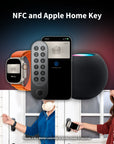
NFC & Apple Home Keys: Easy, Secure Access
After your run, use your Apple Watch to unlock the door effortlessly. This is especially convenient during cold months, removing the need for manual unlocking. You can also remotely set up Apple Home Keys for family members without them needing to approach the door. Additionally, the original key remains available, so you don’t have to worry about forgetting it or rekeying.

Effortless Security with Auto Locking
The internal motion sensor assists door-position detection, with door-left-open alerts and automatic locking. Configure, calibrate and test these functions on the installed door.

Silently Unlock Your Door with Quiet Mode
Quietly unlock the door in the morning by gently turning the knob and secure it by pressing the confirm and lock buttons when leaving. At night, simply press the confirm button on the keypad and verify with your Apple Home Keys, PIN, or fingerprint to silently unlock the door, ensuring your family's uninterrupted sleep.


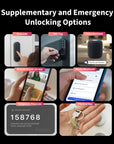
Supplementary & Emergency Unlocks for Enhanced Security
The U200 offers standard and emergency unlock options, including mechanical keys, personalized PINs, and fingerprint recognition. Integrated with the Aqara Home app and compatible with third-party systems, it provides secure and convenient access solutions.

Charge the Lock While in Use
U200 can operate while charging from a suitable USB supply. Secure the power source and cable away from the moving door, and check the accessories supplied with your purchased version.

Flexible Lock and Keypad Power Options
The lock uses an Aqara rechargeable battery. The keypad uses four AAA batteries or a 12–24V AC/DC 0.5A wired supply, installed by a qualified electrician according to the manual. The keypad is IPX5-rated, operates within its specified temperature range and includes a tamper alert.

Easy Installation for Seamless Integration
The U200 effortlessly installs over your existing door lock with an Emergency Function. No complex setups or door modifications are needed, providing a simple way to enhance home security

Cylinder Emergency Function Required
The U200 works with cylinders that allow unlocking from the outside with a key, even if a key is inserted inside. This ensures compatibility and enhanced security.

Requirements of Key and Cylinder


Supports Euro profile and select Scandi cylinders. Please ensure your cylinder is equipped with an Emergency Function.*

Suitable for single-cylinder deadbolt locks. Supports backsets of 2-3/8"(60 mm) and 2-3/4" (70 mm). PH1 screwdriver is needed for installation.
2-in-1 Matter Controller & Thread Border Router
A growing number of Thread Border Routers with Matter controller functionality are tested:

Unlocked with a temporary password
THEN turn on the ceiling light, set AC to 18° C, the speaker starts to play some music
If you're at work or busy with other errands and can't personally welcome your remote guests, don't hesitate to rely on smart home automation. The unlocking mechanism will alert the system that your guest has arrived, making them feel at ease in your home.


IF lock verification failed multiple times
THEN Camera E1 enables person tracking and record video
Configure an automation to link repeated failed lock verification to supported tracking or recording on an indoor Camera E1, using compatible hubs and settings. This response requires explicit setup; position the camera with household and visitor privacy in mind.


Unboxing & Reviews


Specifications


FAQ
Is a Smart Lock U200 compatible with a door without a handle?
Yes, the U200 can pull the latch, making it suitable for doors with handles or those with only a keyhole. To use this function, enable the “Pull Spring Feature” in the settings of Aqara Home app.
What kind of lock is compatible with the U200?
Compatible Locks: EU Mortise Lock, US Deadbolt Lock
What is Emergency Function?
A cylinder equipped with this feature enables it to be unlocked from the outside using a key, even if another key is already inserted on the inside. The U200 is specifically designed for compatibility with cylinders that offer this capability.
Does Aqara provide suitable cylinders?
If your current cylinder is incompatible, consider the Aqara EU Profile Adjustable Cylinder. Check dimensions, compatibility and regional availability before purchase.
How do I calibrate the door lock?
1) For Aqara Home Users: Option 1: Go to "Settings" > "Calibrate Lock" in the app and choose either "Automatic Calibration" or "Manual Calibration." Option 2: Long press (3s) the Set Button in the Door Lock for auto-calibration. 2) For Matter Users: After installation, press and hold the "Set" button on the Lock for 3 seconds to initiate auto-calibration.
What is U200’s Wireless Protocol?
The U200 supports Matter over Thread, ensuring seamless interoperability across various smart home ecosystems.
Do I need a Matter hub to use this product?
1) Aqara Home Users: No hub is needed, but the Aqara M3 Hub is recommended for enhanced features like remote control and automations. 2) Matter Users: A Thread Border Router that supports Matter is required.
What functions are available with the Aqara M3 Hub?
Binding to the Aqara M3 Hub allows for automations, remote lock/unlock, and more features in future updates.
Do I need Aqara Home to use this product with other ecosystems?
Basic functions like locking and unlocking work with third-party ecosystems. However, we recommend using the Aqara Home app to access exclusive features and detailed settings such as Manual Calibration, Auto Lock, Auto-Turn Lock/Turn to Lock, Pull Spring Feature, and more.
Why can’t Smart Lock U200 be bound to other ecosystems?
For a lock already paired to Matter, open the sharing or pairing window in its current platform and use the new pairing code in the next platform. Check Thread connectivity, controller compatibility and updates. Factory reset only according to the manual, understanding that it erases settings.
How to use home keys?
After adding the compatible lock in Apple Home, a home key is added to Wallet. Hold a compatible iPhone or Apple Watch near the keypad NFC reader. Express Mode lets you use the key without unlocking or authenticating each time; authentication mode uses Face ID, Touch ID or a device passcode as supported.
What should I do if the U200 door lock cannot be bound to the Home app or fails to generate passwords and HomeKeys?
Update the lock and Apple devices, check iPhone, home hub and Thread border router compatibility, then follow the U200 pairing instructions in Apple Home. If already paired elsewhere, use a Matter sharing code from that platform. Review the reported error, network and account settings, and contact Aqara or Apple support if needed. Factory reset erases lock settings; follow the manual and retain an alternative entry method before resetting.
Is it possible to use this product without connecting to a smartphone?
A smartphone is required to connect the Smart Lock U200 to Aqara Home or other Matter ecosystems. After adding the admin and calibrating the lock, it can be used directly.
Does this product support setting a periodic password for visitors?
Guest codes, including temporary or scheduled options supported by your firmware, can be managed in the app. Local settings use Bluetooth; remote management requires a compatible hub and platform. Available options vary between Aqara Home, Apple Home and firmware versions.
How to reset the lock?
Follow the factory-reset procedure for your U200 version, verifying administrator authorization when requested. Steps depend on how the lock is paired. Reset erases users and connection settings. Keep the door open and a mechanical key available, then set up and calibrate the lock again.
How to reset the lock if I forget my password?
Please contact our customer service for assistance.
If the lock or keypad is out of power, how to unlock the door?
Respond promptly to low-battery warnings by replacing keypad batteries or charging the lock; do not rely on a fixed reserve duration. If only the keypad is flat, Bluetooth access through Aqara Home is available while the lock remains powered. If the lock is flat, use the mechanical key with an emergency-function-compatible cylinder.
What if the fingerprint reader cannot recognize my fingerprint?
Re-register your fingerprint as it may change over time. For children and the elderly, update fingerprints regularly or register multiple fingers. Ensure fingers are dry and clean.
What is the average battery life of the U200?
Up to 6 months with up to 8 daily lock/unlock actions via fingerprint or NFC. Battery life may vary based on usage and conditions.
How do I power the U200 keypad with an external wired supply?
Power the keypad with a 12V-24V AC/DC 0.5A supply. A compatible transformer should be installed by a professional electrician.
What is Quiet Unlock Mode, and how do I activate it?
1) Local Settings: – Quiet Lock Mode: Long press (3s) Lock Button in the Keypad; or Single press the Confirm Button followed by single press Lock Button – Quiet Unlock Mode: Single press the Confirm Button followed by password or fingerprint unlocking in the Keypad 2) Aqara Home Settings: Enable under "Settings" > "Quiet Unlock Mode."
What is the Auto-Lock feature, and how do I enable it?
Enable Auto-Lock in Aqara Home after calibrating the lock. Test door-closure detection and locking on your installed door before relying on the feature.
What if I am locked out after multiple authentication failures?
Repeated failed authentication can temporarily block further code attempts. Wait for the configured interval or use another authorized entry method, then review lockout settings. Limits and durations depend on firmware and settings.
How can I update the lock?
Check firmware updates in Aqara Home. Keep the phone near the lock, with sufficient battery power and a stable connection until completion. Matter platforms may also provide updates on a different release schedule.
How to use remote lock/unlock?
Aqara Home Users: Bind the lock to the Aqara Hub M3 for remote features. Matter Users: Use a 2-in-1 Matter Controller and Thread Border Router.
How can I add fingerprints and passwords without using the app?
An administrator can add users locally using the voice prompts and management procedure in the manual. Keep the door open, start user management on the keypad and verify administrator credentials when requested. Steps vary with Aqara Home or Matter pairing.
Does U200 support Wi-Fi?
No, it supports the Thread protocol, which is more stable and offers longer battery life.
What if the lock does not respond after verifying the password?
Check if the lock is out of battery. If the issue persists after replacing the battery, contact customer service: support@aqara.com.
How to disarm the Tamper Alarm?
Verify with an authorized administrator fingerprint or code and follow the manual to silence the tamper alarm. The procedure depends on pairing configuration; do not factory-reset the lock merely to silence an alert.