


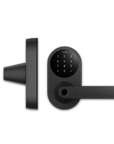
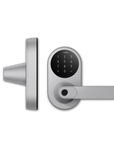




Smart Lock U300
Grab a bundle & explore our kits!
-
Matter over Thread Support: Aqara Smart Lock U300 enhances home security by seamlessly integrating with systems like Apple Home and operating for up to 10 months on a single set of replaceable batteries. As the first lever lock to support Matter and Home Key, it connects effortlessly with multiple platforms and integrates with the Aqara devices via the Aqara hub M3, providing robust customization and superior security.
-
NFC and Apple home keys: The U300 simplifies home entry by enabling unlocking with a tap from an iPhone or Apple Watch, even when these devices are out of power, and supports high-security NFC cards for additional convenience and flexibility. Utilizing advanced Apple Matter and Thread technologies for secure, power-independent access, and employing NFC cards that cannot be copied, the U300 combines top-tier security with affordability, making it an ideal choice for enhancing home security.
-
Ergonomic Fingerprint Reader: The U300 enhances convenience and security with a fingerprint reader integrated directly into the handle, enabling instant access through a simple grasp. It can store up to 25 fingerprints and unlocks in just 0.3 seconds, making it ideal for families and official room. Equipped with a 160×160 semiconductor sensor, the U300’s fingerprint reader provides fast, accurate recognition with a low False Acceptance Rate (FAR) of less than 0.0001%, ensuring both high security and reliable performance.
-
Multiple Unlocking Methods: The U300 offers multiple unlocking methods including touchscreen keypad, fingerprint, mechanical keys, PIN codes, and Bluetooth, complemented by emergency USB-C charging to prevent lockouts. It integrates with various smart home systems for added convenience and security. Easy to install with button activation or voice prompts, the U300 uses AES encryption for secure data storage and features anti-peep PIN protection, ensuring reliable and flexible access control.
-
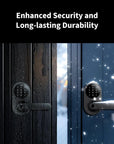
Focus on Security and Durability: Building for both indoor and outdoor use, enduring extreme weather including rain and temperatures down to -22°F. It's durable, easy to maintain, and ensures secure access year-round. With an IPX4 rating, the lock withstands harsh conditions, features a motor-driven design to prevent forced entry, and uses high-quality materials like tempered glass and anti-fingerprint coating for lasting security and durability.
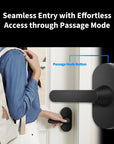
- Effortless Access through Passage Mode: Featuring easy toggling between Passage and Auto-Lock modes on the device, ideal for busy commercial spaces and garage doors. It allows quick, glove-friendly access without needing fingerprints or passwords. The lock enhances security with local-only Passage Mode activation and voice-prompted setup, making it versatile and reliable for various settings.
- Exclusive Features of Aqara Home App: The U300 is user-friendly and versatile, enhancing functionality with the Aqara Home app for various unlocking methods and settings. It connects to the Aqara Matter Controller for improved automation with devices like the Video Doorbell and supports guest access through temporary passwords, even offline. Suitable for both left and right-handed doors, the U300 provides adaptable and reliable security, making it an ideal smart lock solution.
 Aqara
Aqara
 Apple Home
 Alexa
Alexa
 Google Home
 SmartThings
 IFTTT
IFTTT
 Home Assistant
 Matter

Smart Lock U300
Ultimate Smart Lock Retrofitted for you


Matter over Thread Support
The Smart Lock U300 uses Matter overThread for fasteroperations, security, and a 10-month battery life.

NFC and Apple Home Keys
The U300 unlocks via iPhone/Apple Watch,even without power, and supports secure NFC cards.

Ergonomic Fingerprint Reader
Supports fingerprints, access codes, NFC cards and Matter users. Check the user capacities available for your lock version and firmware.

Additional Unlocking Methods
The U300 also has PlN codes, Bluetooth, USB-C emergency charging, and integrates with third-partysystems for secure access.

Security and Durability
Rated IPX4, the U300 is ideal foroutdooruse, operatingdown to -22°F and in rainy conditions.

Effortless Access through Passage Mode
The U300 switches between Passage Mode and auto-lock after user verification, ideal forcommercial spaces.

Temporary Passwords
U300 supports temporary passwords, including Offline Passwords (One-Time Passwords) and Periodic Passwords.

Exclusive Features of Aqara Home
Adding the U300 to the Aqara app enables more unlock methods, automation, and integration with other Aqara devices.

Enhanced Connectivity with Matter over Thread Support
The Smart Lock U300 uses Matter over Thread technology for faster operations, lower power consumption, and up to 10 months* of battery life. It offers seamless local functionality and enhanced security, making it a reliable solution for modern smart homes.
*Assuming the door is unlocked via fingerprints 10 times a day
Exclusive Advanced Features of Aqara Home
Integrating the U300 with the Aqara Home app unlocks additional settings, versatile unlocking methods, and enhanced automation* capabilities through the Aqara Thread-enabled Matter Controller, offering a richer and more customizable smart home experience.
* Requires an Aqara 2-in-1 Thread Border Routerand Matter Controller


Tap to Unlock with Apple Home Keys*
Unlock U300 with a compatible iPhone or Apple Watch. Low-battery operation depends on the Apple device supporting power reserve.
Additionally, the U300 also works with NFC cards** in the same way, tap to unlock.
*Requires a 2-in-1 Apple Matter Controller and Thread Border Router to achieve tap to unlock with Apple home keys.
** NFC cards need to be purchased separately.
Advanced Fingerprint Reader for Enhanced Security and Comfort
The fingerprint reader sits in the handle for a natural unlocking motion and supports multiple users. Check User Management for the capacity available on your device version.
The sensor array is 160 × 160 pixels. Verification performance depends on enrollment quality, finger condition and use.


Multiple Unlocking Methodsfor Enhanced Flexibility
The U300 provides a variety of unlocking methods, including a touchscreen, fingerprint recognition, mechanical keys, customizable PlN codes, or Bluetooth connection. The U300 requires a Third Party Thread-Enabled Matter Controller for full ecosystem integration.

Effortless Access for Guests with Passage Mode
After verifying the user’s fingerprint or password, the U300 lock allows you to activate Passage Mode*, keeping the door unlocked for frequent access, perfect for gatherings or backyard parties. You can easily switch between Passage Mode* and auto-lock for both flexibility and security.
*Passage Mode can be enabled or disabled directly on the lock; however, for safety reasons, it cannot be activated remotely via the mobile app - only deactivated.


Generated by algorithm, producing 8 sets per hour. Even if the hub goes offline, you will be able to issue the password remotely.

Passwords valid for a specific period, suitable for guests or
Airbnb scenarios. (User Management>>Temporary Users)
*Requires an Aqara 2-in-1 Thread BorderRouter and Matter Controller

Whether you're using Apple Home, Google Home, or other Matter-compatible systems, the U300 ensures flexible and secure smart home connectivity.

- Backset of 2 3/8-inch or 2 3/4-inch (60 or70mm)
- Wooden door with a thickness between 1 3/8-inch to 2 11/64-inch(35-55mm)
- Diameter of door hole should be 2 1/8-inch (54mm)
Unboxing & Reviews


Specifications


FAQ
What kind of lock is compatible with the U300?
The U300 is compatible with and can replace common single-latch handle locks or single-latch knob locks on the market. Due to slight variations in design specifications between different models, please refer to the actual situation.
How to change the handle direction?
Before installation, remove the internal screws, rotate the handle 180°, then tighten the screws. The screw positions of the internal and external panels should match the direction of the handle. You can also watch the installation video for a more intuitive installation guide.
What is U300’s Wireless Protocol?
U300 supports Matter over Thread, Bluetooth for local setup and control, and NFC for compatible access credentials.
Do I need a Matter hub to use this product?
1) Aqara Home users: The door lock functions can be used normally without a hub, but it is recommended to use Aqara M3, M100, or G5 Pro hub to enhance remote control and automation functions. 2) Other Matter ecosystem users: A Thread border router that supports Matter is required. For more information, please visit the link: https://www.evehome.com/en/hub
What functions are available with the Aqara M3 Hub?
Only by binding the Smart Door Lock U300 to an Aqara M3, M100, or G5 Pro hub device can you achieve scene automation, remote locking/unlocking, and more features in future updates.
Do I need Aqara Home to use this product with other ecosystems?
Basic functions such as near-field locking and unlocking are natively compatible with third-party apps. However, we recommend using the Aqara Home App to access exclusive features and detailed settings, such as remote unlocking, passage modes, night lock mode, etc.
Why can’t Smart Lock U300 be bound to other ecosystems?
For a lock already paired to Matter, generate a new sharing code in the current platform and use it in the next platform. Check controller compatibility and Thread connectivity before considering a factory reset, which erases lock settings.
How to use home keys?
After setting up a home key in Apple Home, hold a compatible iPhone or Apple Watch near the NFC reader. Express Mode works without unlocking or authenticating each time; authentication mode uses Face ID, Touch ID or a device passcode as supported.
What should I do if the U300 door lock cannot be bound to the Home app or fails to generate passwords and HomeKeys?
Update the lock and Apple devices, check phone, home hub and Thread border router compatibility, and follow the pairing procedure. Use a new Matter sharing code if paired to another platform. Review the error, network and account settings; contact Aqara or Apple support if needed. Do not reset the home or lock as a first step: lock reset erases settings and requires setup again.
Is it possible to use this product without connecting to a smartphone?
To use all features and settings normally, you need to connect the Smart Lock U300 to the Aqara Home App on your phone. After binding and configuration, it can be used directly.
Does this product support setting a scheduled password for visitors?
1) Aqara Home App users: You can set periodic passwords or one-time passwords via Bluetooth connection. 2) Apple Home App users: You can set passwords remotely through the Home App.
How to reset the lock?
Follow the U300 manual reset procedure, with administrator verification when requested. Reset erases users and settings. Keep the door open and retain the mechanical key, then set up the lock again.
How to reset the lock if I forget my password?
Please contact our customer service for help.
If the lock or keypad is out of power, how to unlock the door?
Replace batteries promptly after a low-battery warning; do not rely on a fixed reserve duration. If power is exhausted, use the mechanical key or provide emergency USB-C power before using an authorized unlocking method.
What if the fingerprint reader cannot recognize my fingerprint?
Make sure your finger is dry and clean before trying to unlock. Since fingerprints may change over time, please re-register periodically. For children and the elderly, please update fingerprints regularly or register multiple fingers.
What if I am locked out after multiple authentication failures?
Repeated failed authentication may temporarily block code attempts. Wait for the configured interval or use another authorized entry method, then review failed-attempt settings. Limits and durations vary with settings and firmware.
How can I update the lock?
Aqara Home users: Update firmware through the settings page. Keep your phone close to the device during the update process (15-20 minutes). Apple Home users: OTA updates are supported through Apple Home. Note that the update frequency and timing between Aqara Home and Apple Home may not be synchronized.
How to use remote lock/unlock?
Aqara Home users: Bind the door lock to an Aqara M3, M100, or G5 Pro hub device to use remote features. Apple Home users: Need to connect to an Apple home hub (such as HomePod or Apple TV) and a Thread protocol gateway to achieve remote control.
How can I add fingerprints and passwords without using the app?
Click the settings button (after binding): Enter the local settings page. If an Aqara administrator is set, administrator credentials are required. If no Aqara administrator is set, you can enter directly.
Does U300 support Wi-Fi?
No, it does not. The Smart Door Lock U300 supports the Thread protocol, which is more stable than Wi-Fi and has a longer battery life.
What if the lock does not respond after verifying the password?
Check if the lock is out of power. If the problem persists after replacing the batteries, please contact customer service: support@aqara.com.
How to install the lock? Is there an installation video?
1) Download the Aqara Home App, go to the Smart Lock U300 page, and follow the prompts to complete installation. 2) Scan the QR code to view the installation video in the user manual. 3) Scan the QR code to view detailed installation instructions in the electronic user manual.
What certifications and tests has Smart Lock U300 passed?
U300 supports Matter and its outer panel is rated IPX4 for splash resistance. Refer to the device label and official conformity documentation for regulatory certifications applicable to your regional model.
Can I replace the lock cylinder by myself?
Do not disassemble the internal lock structure to replace the cylinder yourself. Consult Aqara support or a qualified locksmith about compatible parts, replacement procedures and applicable service terms.
What materials are the Aqara Smart Door Lock U300 made from?
The touch panel uses tempered glass material, with excellent transparency while being more durable and scratch-resistant. The outdoor panel uses a matte zinc alloy material for greater hardness. The indoor panel is made of plastic material with a metal coating on the surface, effectively preventing scratches and fingerprint residue.
What kind of lock body does the Aqara Smart Door Lock U300 use?
U300 uses a lever-lock latch with an adjustable 60 or 70 mm backset. Check the door preparation and dimensions against the installation guide.
Is the Aqara Smart Door Lock U300 aware of my door's closing and locking state?
U300 reports lock states such as locked, unlocked or malfunction. Lock state is not the same as whether the door is physically closed; check the functions supported by your firmware.
What types of doors are the Aqara Smart Door Lock U300 compatible with?
The lock cylinder of the Aqara Smart Door Lock U300 is compatible with most wooden doors on the market, and the installation wood door thickness should be between 35mm - 55mm.
Is the Aqara Smart Door Lock U300 limited to specific door-opening directions?
There are no restrictions. The Aqara Smart Door Lock U300 supports all door opening directions, including left/right, inward/outward.
Is the Aqara Smart Door Lock U300 waterproof and can it be used outdoors?
The outer panel is IPX4-rated for water splashes. Protect the inner panel according to the installation guide. IPX4 does not cover immersion or strong water jets. Install within the specified temperature and humidity limits.
What is the working temperature and humidity for the Aqara Smart Door Lock U300?
External panel operating temperature: -30 °C ~ 55 °C Internal panel operating temperature: -10 °C ~ +55 °C Internal panel operating humidity: 0 ~ 93% RH
How is the Aqara Smart Door Lock U300 powered?
The U300 is powered by just 4 LR6 AA batteries. In emergency situations, you can use the USB-C charging port on the side of the external panel to power the device using an external power source.
How long is the battery life of the Aqara Smart Door Lock U300?
The average battery life is 10 months, but this will vary depending on different working environments and conditions. Battery performance decreases in low-temperature environments. Battery life was determined by Aqara laboratories using LR6 AA batteries and simulating 10 wake-ups per day at 25℃.
What should I do if the Aqara Smart Door Lock U300 runs out of power?
1) If you are outside, you can power the lock through the emergency USB-C charging port at the external panel button. 2) If you are inside, simply replace the LR6 AA batteries.
How does U300 handle electromagnetic interference?
The lock is designed to resist electromagnetic interference and has undergone electromagnetic compatibility testing. Do not intentionally expose it to high-voltage sources or unsuitable test equipment; follow the operating conditions in the manual.
How many ways can I unlock the Aqara Smart Door Lock U300?
The Aqara Smart Door Lock U300 supports 7 unlocking methods: 1) Fingerprint 2) Password (regular, one-time, periodic) 3) HomeKit / Siri (Bluetooth, remote)/Apple Home Key 4) Aqara Home (Bluetooth, remote) 5) NFC cards (Aqara and Mifare M1 cards) 6) Automatic unlocking via Aqara G4, doorbell automation 7) Mechanical key *Aqara Home app and HomeKit support short-range Bluetooth unlocking. *Aqara Home App, HomeKit support remote unlocking, provided there is a supported hub at home. *Supports effective Siri voice control, but Siri requires an Apple hub, such as HomePod or Apple TV.
What can I do if the keyboard of the Aqara Smart Door Lock U300 is locked due to repeated verification failures?
If this lock is locked due to failed verification, you can still unlock normally through the application (Aqara Home/Apple Home) or mechanical key. After a few minutes, all verification functions will return to normal. You can also change the lock settings through the Aqara Home application.
When do I need to use the mechanical key for the Aqara Smart Door Lock U300?
The mechanical key is designed to provide normal unlocking in special emergency situations when users cannot use regular verification methods (fingerprint/password/mobile application/NFC/HomeKey). It is recommended to keep the key in your car or office, just in case.
How many sets of passwords can the Aqara Smart Door Lock U300 support?
The Aqara Smart Door Lock U300 supports up to 75 simultaneous passwords, including regular passwords and temporary periodic passwords. Additionally, up to 8 sets of one-time passwords can be generated per hour.
How many digits are the passwords of the Aqara Smart Door Lock U300? Is phantom password supported?
Supports 4 to 10-digit fixed numeric passwords. It also supports phantom passwords up to 20 digits (including 6-10 digit fixed passwords). A phantom password allows you to add any number before and after the fixed password to prevent intruders from peeking when you enter your password. The Aqara Home platform can set 6-10 digit fixed passwords, and if other Matter platforms can set 4-10 digit passwords, they are also compatible with the U300.
Does the Aqara Smart Door Lock U300 support one-time passwords?
Yes. You can generate temporary one-time passwords through the Aqara Home application.
How many fingerprints does the Aqara Smart Door Lock U300 support?
U300 supports fingerprints for multiple users. Check User Management and the specifications for your device version for its available capacity; published product documents contain differing figures.
How do I set fingerprints on the Aqara Smart Door Lock U300?
Install the Aqara Home App, add and connect the door lock, then set up fingerprints according to the App prompts. You can also press the settings button and follow voice prompts for local fingerprint setup.
What if the Aqara Smart Door Lock U300 prompts unsuccessful fingerprint entry?
If the Aqara Smart Door Lock U300 indicates fingerprint enrollment failure, make sure your finger is dry and that there is no obvious damage to the fingerprint. Complete fingerprint collection requires seven attempts. Press your finger completely on the recognition area and try changing the enrollment angle according to voice/Aqara Home App prompts (avoid repeatedly enrolling the same angle). For a better unlocking experience, we recommend enrolling the thumbprint of your dominant hand.
Why do fingerprint verifications of the Aqara Smart Door Lock U300 fail?
Make sure your finger is free from dirt or moisture, place your finger completely on the fingerprint recognition area, and try again. If multiple failures cause the fingerprint verification to be locked, use a password and delete the old fingerprint in the Aqara Home App, then set a new fingerprint. You can set multiple fingerprints to avoid verification failure due to issues with a single finger.
Why are the fingerprints of children or elderly more likely to fail the verification?
The fingerprint module unlocks after recognizing, comparing, and verifying the collected fingerprints. Elderly people with severely worn fingerprints and children with shallow or incomplete fingerprints may have reduced success rates with fingerprint unlocking. In such cases, it is recommended to use a password and NFC/HomeKey to unlock.
How does prompt re-locking help after entry?
The lock can re-engage the handle promptly after use, depending on mode and settings. Always check that the door is physically closed; automatic locking does not guarantee prevention of another person following a user through the door.
Why does U300 use Bluetooth?
Bluetooth provides a low-power local connection for setup and control from a nearby phone.
Can the Aqara Smart Door Lock U300 be connected to multiple mobile phones at the same time?
Since Bluetooth only supports 1-to-1 connections, the Aqara Smart Door Lock U300 can only connect to one phone at a time.
How can the Aqara Smart Door Lock U300 be unlocked via Bluetooth locally through the mobile app?
Install the Aqara Home App on your phone and add the door lock. Click the unlock icon on the App homepage, then press the handle to unlock. After adding the door lock to the Aqara Home App, you can also add it to HomeKit and unlock it via Bluetooth.
What is admin permission for the Aqara Smart Door Lock U300 and how to set it?
The initial administrator account is set up when the lock is first added to the Aqara Home App. An administrator account is required to enter local settings mode. The initial administrator account can add more administrator accounts on the Aqara Home App.
What other types of permissions are supported besides the admin permission, on the Aqara Smart Door Lock U300?
In the Aqara Home App, permissions are divided into three types: administrator, regular user, and temporary user. Administrator permissions support various credential unlocking methods, adding users, and lock function settings. Regular users can use password, fingerprint, NFC, and other unlocking functions. Temporary users only support periodic password unlocking.
How many accounts does the Aqara Smart Door Lock U300 support?
User capacity and roles depend on the management platform and firmware. Check User Management in Aqara Home or your Matter platform for the available limit on your device.