


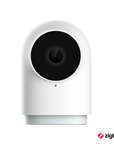




Camera Hub G2H Pro
Grab a bundle & explore our kits!
Information
[The Most Complete HomeKit Support & Two-way Audio] Connect your Aqara Indoor Camera G2H Pro to Apple HomeKit Secure Video, which can prevent hackers from stealing your data and protect your privacy at home. The G2H Pro supports face and package recognition and notifications that are processed locally on your HomeKit hub. You can speak with your family using two-way audio while viewing real-time video images remotely. (*Note: Power adapter is not included.)
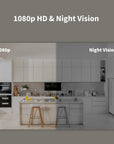
1080p HD & Night Vision】1080p Full HD recording with 146° wide-angle lens offers you stable and smooth video day or night. It will notify you via smartphone and built-in siren, and record a short clip in case of an abnormal sound or motion being detected. The short clip will be sent to the cloud immediately(no subscription or monthly fees required), while the full footage will be recorded locally.
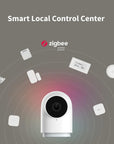
【Smart Local Control Center】The Camera G2H Pro can also work as a Zigbee 3.0 hub, which can connect up to 128 Aqara Zigbee child-devices and allow for seamless integration across Aqara’s sensors and home automation devices. With the G2H Pro, when your Aqara sensors are triggered by an event such as opening the door, it will be marked on the video timeline, and you will be able to see video notifications. Alexa, HomeKit, Google Assistant and IFTTT are supported.
【Multiple Storage Methods & WPA3 Wi-Fi】Apart from iCloud (50 GB or more iCloud Subscription is required) and micro SD card (up to 512 GB, not included) storage methods, the G2H Pro also supports local NAS storage that uses the Samba protocol. Please note: to use NAS storage, a supported micro SD card as well as SMB1.0-compatible software are required. 2.4 gigahertz Wi-Fi network connection is required and 5 GHz Wi-Fi is not supported.
【We Care About Your Privacy】 The G2H Pro has a local software masking function, which can prevent certain parts of the image from being recorded or sent to third-party servers. Besides, the data streams from the camera are encrypted and the latest Wi-Fi security standard WPA3 is supported to further protect your data. Moreover, by setting the configurable activity zones, unnecessary alerts can be reduced.
 Aqara
Aqara
 Apple Home
 Alexa
Alexa
 Google Home
 IFTTT
IFTTT

Aqara Camera Hub G2H Pro
Our best-selling security camera hub is now even better.

Features

Built-in Zigbee 3.0 Hub
You can connect up to 128 Aqara sensors and controllers and enjoy home automation, remote control, and third-party ecosystem support*.

All-Round Compatibility
The G2H Pro now supports Apple HomeKit, Amazon Alexa, Google Home, and IFTTT, and connects compatible child devices to HomeKit, Alexa, Google Assistant, and more.

HomeKit-Enabled 2-Way Audio
You can make voice calls while viewing real-time video images and communicate with your family remotely. A microphone is equipped for noise reduction and the recording distance is up to 5 meters.

Fullest HomeKit Support
Apart from HomeKit Secure Video**, it now supports all 4 modes of the HomeKit Security System which is also automatically synced with the Aqara Home Alert System.

IR Night Vision with Invisible LEDs
Thanks to 940 nm infrared night vision LEDs, the G2H Pro Camera Hub doesn't have an annoying glow that could disturb your sleep during the night.

NAS and Larger Capacity MicroSD Support
Apart from the microSD card***, which now has an increased maximum capacity of up to 512 GB, the G2H Pro also supports local NAS storage that uses the Samba protocol.

Quick View with Timelapse and Event Timeline****
The G2H pro now supports a time-lapse clips generation to summarize the day in one short video. Moreover, the event timeline makes each of the events visible on the video timeline.

Activity and Privacy Masking Zones
Apart from the configurable activity zones, the G2H Pro has a local privacy masking, that can prevent certain parts of the image to be recorded or sent to the third-party servers.
*1. Repeaters such as Wall Switch with Neutral or Smart Plug are required to achieve this number of connected devices.
**2. To support HomeKit Secure Video, an iCloud subscription, HomeKit hub, and up-to-date iOS/iPad OS/ tvOS are required.
***3. MicroSD card not included.
****4. Aqara sensors are required for this functionality.
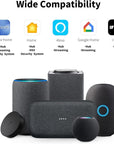
All-Round Compatibility
The Camera Hub G2H Pro is compatible with a wide range of smart home ecosystems and voice assistants.
It can stream to Apple’s Home app, as well as Amazon and Google smart displays.
At the same time, it exposes the connected child devices to HomeKit, Alexa, Google Assistant, Alice, IFTTT and more.


Now, the Most Complete HomeKit Support
• Intelligent Recognition
Face and package recognition are now supported, and notifications are processed locally on your HomeKit hub such as HomePod, Apple TV, or iPad.
• HomeKit Security System
Basic, Home, Away, and Night alarm modes are introduced for additional customization, in order to allow the alarm to be triggered in different areas and/or at specific times.
• Real-Time Two-Way Audio
You can use the G2H pro to send high-quality video messages and speak with your family in real time using two-way audio with a maximum pickup distance of up to 5 meters.
View of Wider-Angle, 1080p Full HD with Flexible Placement
G2H Pro now supports an even wider viewing angle of 146° (diagonal), a more "fish-eye" look, that enables a single camera for the entire room.

Captured by a crisp 1080p sensor, the viewing is crystal clear no matter how bright or dark the environment is. The built-in 940 nm infrared night vision LEDs don't have an annoying glow that could disturb your sleep during the night.

The strong magnet inside the base makes it capable of attaching to the surface of metal objects. The package includes an iron wall mount and screws, which support multiple installation methods.

Receive Useful Notifications, or Easily Check by Timelapse and Event Timeline when You are Away

Mark Zones You Care About, or Exclude Partial Areas for Enhanced Privacy
Mark zones you want to be tracked to take good care of your baby or pets and reduce unnecessary alerts. Moreover, the G2H Pro now has a local privacy masking, that can prevent certain parts of the image to be recorded or sent to third-party servers such as Google or Amazon.

Connect Aqara sensors and controllers to the Camera Hub G2H Pro, and you will be able to configure powerful local automations.
IF Motion is detected
THEN The lights will turn on and you will get immediately notified.
All of such events will be marked on the video timeline.


Connect Aqara sensors and controllers to the Camera Hub G2H Pro, and you will be able to configure powerful local automations.
IF Your boyfriend comes home
THEN Trigger the ringtone “Hey honey!“


Specifications


FAQ
What is Ark Technology?
Ark technology is a distributed multi-level localized disaster recovery technology in the Aqara smart home system. Currently, Ark technology has been updated to version 2.0. It includes hub local automation capability, multi-hub standby replacement, proxy hub disaster recovery,etc. When cloud servers, Internet, router, hub running faults, it can provide disaster recovery protection against these issues at multiple levels, try to ensure local automation and scenario execution, and enhance the reliability and stability of the Aqara smart home system.
What is proxy hub disaster recovery capability?
When an Aqara hub device (such as the Smart Hub M3, Hub M2, P3 Air Conditioning Companion, G3 Camera, etc., all of which have hub functionality) experiences a malfunction or power outage, and certain connected Zigbee devices under that hub are capable of acting as proxy hubs, those proxy hubs will take over the execution of basic local automations and scenes.
Which devices are currently able to be proxy hubs? (Some of the following products are only available in some countries or regions)
Smart Scene Panel Switch S1 (firmware version not lower than 5.2.6_0559) Aqara Smart Curtain Motor C3 (firmware version not lower than 0.0.0_0012) Light Strip T1 (firmware version not lower than 0.0.0_2729) Smart Light Strip Driver T1 (firmware version not lower than 0.0.0_0024) Ceiling Light T1 (firmware version not lower than 0.0.0_0026) Aqara Spotlight V1 (firmware version not lower than 0.0.0_0025) Aqara Smart Wall Socket H2 (firmware version not lower than 0.0.0_0027)
What are the precautions for proxy hub disaster recovery?
1. Since the disaster recovery of the proxy gateway involves the collaboration between different devices in the entire system, it is necessary to update the firmware of the devices (including the gateway firmware, the proxy gateway firmware, and the firmware of other Zigbee Router devices) to the latest version in order to have good coordination capabilities. If the firmware of some devices is not up-to-date and does not have the coordination capabilities of Ark proxy gateway technology, it may cause the proxy gateway to fail to trigger and execute some automated scenarios. 2. In addition, proxy gateway disaster recovery technology, as a disaster recovery means in extreme cases, can only support simple automation conditions and actions (such as switch clicks, device opening, device closing, etc.). For some complex automation, there may be situations that cannot be supported.
How does Aqara camera hub G2H Pro connect ZigBee child devices, and how many child devices can be connected at most?
Press the function button on the top of the camera three times to initiate a Zigbee child-device connection. G2H Pro uses Zigbee 3.0 and supports up to 128 child devices. Reaching this number requires repeaters such as a wall switch with neutral or a smart plug.
How dose Aqara camera hub G2H Pro connect to internet?
You can scan the QR code generated by the Aqara Home app to connect to internet. After the camera is powered on, please open the app and connect the device to 2.4GHz Wi-Fi, according to the voice prompt. Then, the QR code is generated, and you can scan the QR code through the G2H Pro lens for network connection.
What kind of Wi-Fi can Aqara camera hub G2H Pro connect? Does it can connect to mixing frequency Wi-Fi?
The Aqara Camera Hub G2H Pro (Hub Edition) supports 2.4GHz Wi-Fi using the IEEE 802.11b/g/n protocols and does not support 5GHz Wi-Fi. When connecting to a dual-band router, it is recommended to separate the 2.4GHz and 5GHz networks to avoid connection issues.
Why can’t camera hub G2H Pro connect to Wi-Fi?
Please check the distance between camera and router, and make sure the Wi-Fi signal is strong enough. If Wi-Fi is connecting abnormally, please use a Wi-Fi signal amplifier or mobile router to ensure that the device can receive Wi-Fi signals adequately. Make sure you're connecting to 2.4GHz Wi-Fi. Please check that the Wi-Fi SSID or Wi-Fi PWD is correct.
How long can the Aqara Smart Camera G2H Pro (Hub Version) MicroSD card record video?
Aqara Smart Camera G2H Pro (Hub Version) records ultra-clear image quality by default, and the daily video storage capacity needs about 18G. Generally speaking, the 512GB capacity TF card is expected to be stored for 4 weeks, for a total of 28 days.
Can Aqara Smart Camera G2H Pro (Hub Version) record with MicroSD card without network?
Yes. However, you can’t view the video through Aqara Home app without the Internet.
What formats of TF card does Aqara Camera Hub G2H Pro support? How much capacity does it support?
Aqara Smart Camera G2H Pro (Hub Version) supports MicroSD cards with FAT32 format and read and write speed Class 4 or above. It is recommended to choose a MicroSD card with read and write speed Class 10 or above, and the maximum capacity is 512GB.
How many users can simultaneously view a single Aqara Camera Hub G2H Pro (Hub Version)?
There is no limit to the number of client-side connections. It is recommended that up to 4 users watch at the same time, because the more connections, the more processor resources the device consumes (too many user connections will cause real-time picture lags, delays, etc.).
How to install the Aqara Smart Camera G2H Pro (Hub Version) bracket?
The base of the Aqara Smart Camera G2H Pro (Hub Version) bracket contains strong magnets, which support fixing on objects such as refrigerators and iron doors. It can also be pasted on non-magnetic objects by using the 3M glue and iron sheet in the accessories, or by using the fastening screws in the accessories to fix the iron sheet on the non-magnetic object, and then install it.
How many Ringtones can be uploaded by Aqara smart camera G2H Pro (Hub Version), and is there a size limit?
Up to 5 songs, each with a maximum of 5MB.
Why is there no video saved after time lapse is turned on?
Please ensure that during the effective period of the time-lapse photography function, the device does not perform operations such as hibernation, power-off restart, reset, and factory reset to disconnect the video stream for a long time. If the video stream is disconnected for a long time in the middle, or the network transmission is continuously congested for a certain period of time, resulting in the loss of frame image transmission for time-lapse photography, the time-lapse photography will fail.
How does an IOS user upload custom audio files?
IOS user should upload custom ringtone to iCloud at first, then choose the ringtone and upload to camera through Aqara Home app.
Why can't I find the entrance for the NAS storage function of Aqara smart camera G2H Pro (Hub Version)?
Only when inserting the TF card to camera you can find the NAS storage portal in SD storage. That is because NAS storage must be based on a TF card.
What audio formats does Aqara Smart Camera G2H Pro (Hub Verson) support uploading Ringtones?
Only support MP3 audio format.
Why does the QR code generated by the camera scanning app not respond?
It is recommended 32 ASCII characters of SSID and 32 ASCII characters of PWD at most.
Why is the camera G2H Pro frequently offline?
1. Please ensure the device is connected to a stable Wi-Fi network, and avoid situations where the Wi-Fi signal must pass through walls. 2. If using a mesh router system, make sure the device is not located at the center point between mesh nodes, which can cause it to frequently switch between nodes. 3. Ensure your Wi-Fi router has sufficient bandwidth to prevent contention among connected devices.
Why doesn't the Security Guard alarm work when sound and motion detection are detected in the Aqara Home app Security Guard?
To use the G2H Pro’s motion and sound detection as alert system conditions, you must first enable motion detection and abnormal sound detection in the device’s settings.
How to avoid repeated switching of camera night vision?
During installation and use, if the camera is facing reflective objects (such as glass or smooth walls) or nearby obstacles (like walls, cabinets, or enclosures), it may cause strong infrared reflections on the screen. This can interfere with the camera’s ability to accurately switch to night vision, resulting in frequent toggling. It is recommended to avoid such setups during installation.
Why does the camera image become blurred?
Please note that in daily use, do not touch the device lens. Fingerprints or other dirt left on the lens will affect the image effect.