




Hub M3
Grab a bundle & explore our kits!
Information
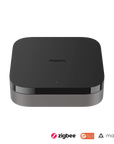
Upgrade your smart home with the Aqara M3 Hub. Featuring multi-protocol support (Zigbee 3.0, Thread, Matter), seamless integration with Apple HomeKit, Google Home, and Amazon Alexa, advanced security features, and easy installation. Enhance your home automation and security today!
Advanced Multi-Protocol Connectivity
Experience unparalleled connectivity with the Aqara M3 Hub, supporting Zigbee 3.0, Thread, and Matter protocols. Seamlessly integrate up to 127 Thread/Zigbee devices and connect third-party devices through the Aqara Home app. As a Matter bridge, the M3 Hub exposes existing Aqara Zigbee devices to Matter-compatible apps like Apple Home, enhancing flexibility within your smart home ecosystem.
Edge Compatibility & Local Automations
Prioritize local control and automation with the Aqara M3 Hub’s Edge Hub capabilities. By superseding existing Aqara hubs, the M3 Hub shifts automations to local operations, ensuring faster response times and increased reliability. Easily migrate Zigbee devices from older hubs and enjoy seamless integration with Matter and HomeKit (reconfiguration required). While most automations run locally, cloud-based notifications remain available for comprehensive home monitoring.
Smart IR Blaster with Feedback & Learning
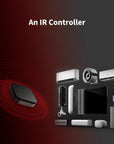
Enhance your home’s automation with the built-in 360° IR Blaster. This smart IR blaster not only sends commands but also provides accurate status updates by detecting traditional remote use. Connect your IR-controlled air conditioning units to Matter and function as an AC thermostat when paired with the Aqara Temperature and Humidity Sensor. (Note: Only one AC device can be exposed to Matter; functionality may vary based on the Matter integration app.)
Optimal Wired & Wireless Connectivity
The Aqara M3 Hub offers both wired and wireless connectivity options to ensure stable and secure performance:
- Dual-Band Wi-Fi (2.4/5 GHz) with advanced WPA3 security for robust wireless connections.
- Power over Ethernet (PoE) Port for reliable wired connectivity.
- USB-C Port for mini-UPS and power bank connections, providing unparalleled stability during power outages.
- (Note: 2A USB power adapter not included.)
Privacy-Focused & Easy Setup
Your privacy is paramount with the Aqara M3 Hub. Designed without microphone or camera components, it ensures your data remains secure. Featuring 8GB end-to-end encrypted local storage, the hub safely stores device lists, configuration parameters, and automation data. The Magic Pair technology guarantees effortless detection by the Aqara Home app upon power-up, while included mounts and screws offer versatile placement options on flat surfaces, walls, or ceilings.
 Aqara
Aqara
 Apple Home
 Alexa
Alexa
 Google Home
 SmartThings

Aqara Hub M3
Continuous Connectivity for Your Smart Devices.

Features

Multi-Protocol Hub with Matter Bridge
Connects Aqara Zigbee and Thread devices, plus third-party gadgets, all via the Aqara Home app.

Local Control & Automation
Acts as a primary hub that prioritizes local control and runs supported automations within the network. Some services and notifications still require internet access.

Reliable Connectivity
Offers dual-band Wi-Fi, Power over Ethernet (PoE), and USB-C for stable wired and wireless connections with WPA3 security.

Privacy & Security
No microphone or camera, featuring encrypted local storage with 8GB eMMC to keep your data private.

Smart IR Blaster
360° IR control with status feedback and AC thermostat functionality when paired with Aqara Temptature Sensor.

Easy Setup & Flexible Placement
Includes mounting accessories and MagicPair technology for quick setup and versatile installation options.
* Visit the Aqara website for the current list of Zigbee devices compatible with Matter.
Multi-Protocol All-in-One Hub
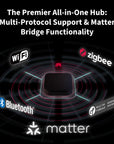
The M3 supports Aqara Zigbee and Thread devices and integrates third-party devices into the Aqara Home app. As a Matter Hub, it ensures seamless communication with other Matter-compatible platforms. Connect up to 127 Thread/Zigbee devices for comprehensive smart home control.
*Device support may vary by ecosystem.


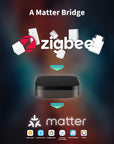
Matter Bridge: Seamless Smart Home Integration
Connects Aqara Zigbee devices with Matter and HomeKit apps, enhancing interoperability and control over your smart home.
*Features may vary depending on the Matter app.
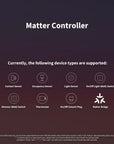
Matter Controller
With Matter Controller functionality, the M3 integrates third-party Matter devices into the Aqara Home app, unlocking easy yet powerful automations for thousands of Matter-compatible devices.

Contact Sensor

Occupancy Sensor

Light Sensor

Light (Dimmable, CCT, RGB)

On/Off,Dimmer (Wall) Switch

Thermostat

On/Off Plug and Outlet

Matter Bridge
*For a list of supported devices, please visit the Aqara.com.
Privacy & Encrypted Storage
The M3 has no camera or microphone. It uses encrypted local storage for supported device lists, settings and automation data.
*More data types will be supported in future updates.


Hub Migration: Easy Upgrade & Data Transfer
Seamlessly migrate from older Aqara hubs with the M3, upgrading your network without needing to reconnect devices manually.
*Note: Camera Hub G2H is not currently supported.
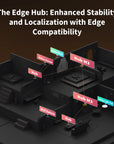
Enhanced Stability & Localization
Centralized-Distributed Smart Home System. Once integrated into the network, it assumes leadership over existing Aqara hubs, centralizing data processing and commanding other hubs for distributed computing.


Local Cross-Hub Automation
Automations move from the cloud to local Edge, ensuring they work even when the internet is down.
*Cloud push notifications still need an internet connection.
Ultimate Stability & Device Binding
If the M3 Hub fails, select routers or mesh repeaters handle basic automations*, keeping Curtain Drivers and Door/Window Sensors operational for uninterrupted smart home functionality.
*For a list of supported devices, please visit the Aqara.com.


Control a wide range of IR devices with feedback and learning capabilities. Detects status and integrates ACs into the Matter system.

Enjoy dual-band Wi-Fi with WPA3, PoE support, and USB-C for UPS or power banks. Provides robust and flexible wired and wireless connections.

Features a 95dB speaker for Aqara Home alerts or announcements. Supports custom ringtones in automations, even without an internet connection.

Comes with mounts, screws, and stickers for placing on surfaces, walls, or ceilings. MagicPair automatically detects the hub in the Aqara Home app when powered on.
IF you have used Aqara Home and Aqara hubs before, you will have two options:
either make M3 lead other Aqara Zigbee hubs, which will enhance their local automation capabilities,
or to migrate all the Zigbee Aqara devices to the M3 and make your setup even more robust


Fully functional air conditioning thermostat by simply connecting a Climate Sensor
Thanks to the built-in IR blaster, the M3 can control your existing IR devices, such as an Air Conditioner. By connecting an external Aqara Climate (Temperature and Humidity) Sensor, you will be able to trigger automations based on the actual temperature of your room, and expose this AC to third-party apps such as Apple Home, Amazon Alexa and Google Home via Matter.


Specifications


FAQ
What is a leading hub? What is the difference between the Aqara Hub M3 and previous Aqara hub products?
1. After connecting to your existing Aqara setup, the Aqara Hub M3 forms a hub cluster, and becomes and takes the lead over other Aqara Zigbee hubs aiming to improve the smart home experience. It converts the automations that involve multiple hubs and child devices connected to them, from Cloud to Edge automations, which are more stable and fast, and coordinates other Aqara Zigbee hubs. 2. Compared to traditional hubs, the Aqara Hub M3 can not only serve as leader of a hub cluster, but also acts as a Thread Border Router. This enables other Matter controllers to connect Thread devices and integrates the newest Aqara and third-party Matter devices into the Aqara Home app. It possesses larger local data storage space, offers offline RTC adjustments, and includes other advanced functions.
If the Hub M3 fails to sync with third-party Matter ecosystems (e.g., Apple Home, Google Home, Alexa, SmartThings, or Home Assistant), how to deal with?
1. Connect the Hub M3 to the Aqara Home App 2. Update the Hub M3 firmware to v4.3.7 or later 3. In the Aqara Home App: Go to the device page Select "Third-Party Matter Ecosystems" Copy the Matter pairing code or save the QR code Enter the code or scan the QR in your third-party Matter ecosystem to sync the Hub M3
Why does the leading hub sometimes change to another one in the Hub Cluster?
When networking multiple Aqara Hub M3s, through data sharing, the hubs will assess in real time each hub's load situation, network communication capabilities, and wireless signal strength, dynamically choosing the optimal node as the leading hub.
If the Aqara Hub M3 went offline, can the configured Edge automations execute?
1. When there are multiple Aqara Hub M3s, the offline hub will be taken over by other functioning hubs to ensure the execution of hub automations. 2. When there is only one Aqara Hub M3, the automations configured within it will not be able to execute.
To be a part of a Hub Cluster, do other hubs need to be upgraded to the specified firmware version?
Yes, please upgrade other hubs to the latest online firmware to function with the Aqara Hub M3.
What are the benefits of Ark Technology in smart home automation?
Ark Technology enhances smart home automation by integrating a suite of disaster recovery technologies. These include local automation capabilities within individual hubs, coordination and automation across multiple leading hubs, standby takeover by multiple leading hubs for increased reliability, and proxy hub disaster recovery. This comprehensive approach ensures more reliable and efficient execution of local automations, significantly improving the resilience and performance of smart home systems.
When multiple Hub M3s are networked, will the saved automations be mirrored?
When the saved automation is an Edge automation (automation conditions span multiple gateways or different LANs), the automation will be backed up across all leading hubs. Non-leading hub automations will be saved within each level of hubs and proxy hub nodes.
When Aqara Hub M3 serves as a leading hub, how many hubs can it manage at the same time?
The maximum number of hubs managed by an Aqara Hub M3 is 10.
Why do I need to scan the MagicPair QR code on the Aqara Hub M3 to connect to the network?
The Aqara Hub M3, having a larger local storage space which may store a substantial amount of user data, is classified as a security-grade device. To ensure that it is operated by the user themselves, it is necessary to scan the MagicPair QR code on the device through the app for a secondary confirmation before connecting to the network.
What kinds of user data are stored in eMMC?
It includes automation configuration, device operation logs, and data collected by child devices, etc.
How large an area can a single Aqara Hub M3 wireless connection cover?
When child devices are evenly distributed and router sub-devices are configured reasonably, the Aqara Hub M3 can cover a space of 100-300 square meters.
What kinds of hubs can be migrated by Aqara Hub M3?
Including Aqara M2 Hub, Aara M1S Hub, Aqara E1 Hub, and other Aqara hubs. Before being migrated, please update the firmware version of the hub to the latest.
After being migrated, how would the old hub functions be retained by the new one?
1. Migration between hubs of the same type, where the new hub will retain all configurations identical to the original hub after migration (Except for the automations configured in third-party apps such as Apple Home) 2. Migration between different types of gateways, where the final retained configurations will be the intersection of the functionalities of the two hubs (for example, migrating from M1S Hub to the Aqara Hub M3, functions related to night lights and automation configurations will be lost).
Can the Aqara Hub M3 be connected to Zigbee and Thread child devices at the same time?
Yes. The Aqara Hub M3 can be connected to Zigbee and Thread child devices at the same time.
Can the Aqara Hub M3 connect Zigbee devices to the Matter platform?
Yes, the Aqara Hub M3 itself serves as a Matter Bridge, which can bridge Zigbee and IR devices to platforms that support Matter.
What types of third-party Matter devices can be connected to the Aqara Home app through the Aqara Hub M3?
Aqara Home offers one of the broadest ranges of Matter device types available on the market, including several uncommon categories: Door and Window Sensor Presence sensor Illuminance sensor Light switch (wall switch)* Dimmer switch (wall switch)* Thermostat Smart plug (switch type) Matter bridging device Dimmable, color temperature, and RGB light Door lock Wireless button Temperature and Humidity Sensor Robot vacuums Dimmable plug Smoke and carbon monoxide alarm Air quality sensor Leak, freeze, and rain sensor Curtain and roller shade Fan, air purifier Air conditioning and heat pump Water valve and water pump Pressure sensor Solar panel, Battery EV charger Washing machine and dryer Refrigerator Cooktop, range hood, stovetop Oven and range Water heater Video player and speaker
When Aqara Hub M3 serves as a Zigbee and Thread hub, how many child devices can it directly connect to? How many child devices can be connected through the router / mesh extender nodes?
Aqara Hub M3 can directly connect to 64 child devices, and can access 127 child devices if bridging through a Zigbee router / Thread mesh extender nodes.
Can Aqara Hub M3 connect to Bluetooth child device?
Bluetooth used for setup does not imply support for every Bluetooth child device. Check the current M3 firmware and supported-device list; do not rely on future features before they are available.
What are the installation ways of Aqara Hub M3?
Three installation ways: horizontal placement, wall mounting, and ceiling mounting.