


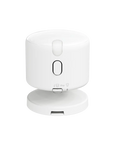

Presence Multi-Sensor FP300
Grab a bundle & explore our kits!
The Aqara FP300 isn’t just a motion sensor—it’s a complete presence detection and environment monitoring solution. With AI-powered sensing, mmWave radar, and dual-protocol support, your home becomes smarter, more comfortable, and energy-efficient without you lifting a finger.
- Precise Presence Detection with AI & mmWave
Combines PIR and 60 GHz mmWave radar to accurately detect both motion and still presence—reducing false alarms and missed detections. AI continuously learns your environment for smarter, more reliable sensing.
- All-in-One Environmental Sensing
Built-in temperature, humidity, and light sensors help optimize your home’s comfort and energy use. Automate lighting, climate control, and more based on real-time data.
- Dual Protocol for Any Smart Home
Works with Zigbee and Thread. Seamlessly connects to Apple Home, Google Home, Alexa, SmartThings, and more via Matter, or unlocks advanced features with an Aqara Hub in Zigbee mode.
- Effortless Customization in the Aqara App
In Zigbee mode, fine-tune your sensor's detection range, adjust reporting frequency, set absence delays, or turn off individual sensors to extend battery life—all through the Aqara Home app.
- Years of Battery Life, No Hassle
Powered by two CR2450 batteries, the FP300 runs up to 3 years on Zigbee or 2 years on Thread, with no need for constant charging.
- Smarter Automations, Made Easy
Use the sensor’s presence, light, and temperature data to create automations that adjust lighting, HVAC, and appliances automatically—making your home more comfortable and energy-efficient.
 Aqara
Aqara
 Apple Home
 Google Home
 Alexa
Alexa
 SmartThings
 Home Assistant
 Homey
Homey

Smarter Presence Detection, No More Guesswork
The FP300 combines PIR and millimetre-wave radar to help detect presence, including some subtle movements while seated. Its stated range is up to 6 metres with a 120° field of view; accuracy depends on installation, environment and settings.


Smarter Comfort, All in One Sensor
The FP300 does more than detect presence—it helps create the perfect home environment.
- Temperature Sensor: Keeps your climate control smart and comfortable.
- Ambient light Sensor: Adjusts your lighting automatically.
- Humidity Sensor: Monitors indoor air to maintain healthy moisture levels.
Smarter Detection That Adapts to Your Home
Supported environmental learning helps distinguish some interference and improve detection settings. Accuracy depends on installation, sensitivity and firmware; false readings remain possible.


Long-Lasting Power, No Charging Needed
Powered by two CR2450 batteries, the FP300 runs for up to 3 years on Zigbee or 2 years on Thread, so you won’t be changing batteries often. Need even longer life? Turn off unused sensors* to save more power.
*Battery life varies by settings and usage. Disabling sensors requires Zigbee mode with an Aqara Hub.
Dual Protocol for Maximum Compatibility
The FP300 works with both Zigbee and Thread, giving you flexible smart home integration.
- Thread Mode
Connect directly to platforms like Apple Home, Google Home, Alexa, Home Assistant, and more via Matter.
- Zigbee Mode
Unlock advanced Aqara features while still enjoying Matter compatibility through an Aqara Hub.


Customize Your Sensor, Your Way
Unlock advanced customization in the Aqara Home app with Zigbee. Fine-tune detection range, adjust absence delay, manage how often temperature and humidity are reported, and even turn individual sensors on or off—tailor the FP300 to fit your exact needs.
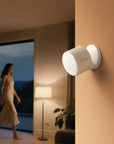
Flexible & Wire-Free Placement

Smarter Automations, Hands-Free Living
Go beyond simple triggers. This sensor combines presence, light, and temperature data, allowing you to create powerful automations where your other smart devices react intelligently to both you and the room's environment.
IF presence is detected and illuminance is under 400 lux
THEN turn on the desk lamp

IF presence is detected and illuminance is under 400 lux
THEN turn on the desk lamp
IF presence is detected and the temperature is over 28°C
THEN turn on air-conditioning cooling mode

IF presence is detected and the temperature is over 28°C
THEN turn on air-conditioning cooling mode

Specifications


FAQ
Why doesn’t the configured "Absence Confirmation Period" match the actual time it takes to trigger a no-presence state?
The "Absence Confirmation Period" feature is used to accurately determine the "no presence" state, avoiding false alarms caused by people temporarily leaving or slight movement. The radar needs to determine "no presence" for a complete cycle before confirming and triggering the "no presence" state. If someone re-enters or environmental disturbances occur during the cycle, the timer will restart from the next "no presence" state. The actual "no presence" trigger time is related to spatial environmental interference and micro-movement states, and is not strictly equal to the set cycle duration. In complex environments, it may take longer to determine "no presence". Shorter cycles ensure faster triggering of "no presence", while longer cycles improve the accuracy of "no presence" determination.
Which wireless protocols does the device support?
The device supports both Thread and Zigbee protocols, and can be added to Aqara Home or third-party supported Matter ecosystems.
What installation methods are available?
The device supports wall mounting, desktop placement, or ceiling installation. It can be secured with adhesive, magnets, or expansion screws. For heights over 2 meters, using screws for secure installation is recommended.
Are there any requirements for the orientation during installation?
It is recommended to face the device towards where people will be, as this makes it easier to detect subtle breathing movements and improves detection accuracy
What should be paid attention to about the installation environment?
Avoid installing near air conditioner vents, air purifiers, or fans. After installation, it needs time to learn the new environment. When there is significant interference, false alarms may occur.
How do I connect through Matter?
Open the Aqara Home App, enter the homepage and click "+" in the upper right corner, and follow the prompts to complete the addition; for third-party Matter ecosystems, start "Add Device" in the corresponding app and scan the device Matter Code to complete.
What are the steps for connecting via the Zigbee protocol?
Enter the Aqara Home App homepage, press the "+", then select the corresponding device, it will ask you to confirm the protocol, and select the Zigbee protocol, download the firmware and select a Hub to complete the addition.
What are the device's operating temperature and humidity ranges?
Operating temperature -10℃ to 50℃, operating humidity 0 to 95% RH, non-condensing.
How do I upgrade the firmware?
After adding the device, update to the latest version on the app's settings page.
What should I do if there is a false presence detection of someone when nobody is there?
In Zigbee mode, the AI Spatial Learning function can be used to reduce false triggers.
How long do the FP300 batteries last?
FP300 theoretical battery life: Zigbee 3 years, Matter 2 years * Test results from Aqara laboratory (at room temperature of 25°C, using default dual presence mode, with 4 hours of human presence per day, 240 environmental data reports per day, connected to a single Aqara Home platform). Actual battery life will be affected by multiple factors, including device operating mode, sensor configuration, trigger frequency, network conditions, usage environment, etc., and may differ from theoretical battery life.
What should I do if the device falsely reports no presence when someone is present / cannot maintain presence status for people remaining still?
· New Device Adaptation Period: When first used or after changing the installation environment, the device needs about 10 minutes (without people present) to learn the spatial environment. To speed up this process, you can execute "AI Space Background Learning" in the "On-Site Configuration" section in Zigbee mode. · Installation Position Optimization: Ensure there are no obstructions in front of the device, and position it to directly face the main area of activity. · Absense Confirmation Period Time Adjustment: Increase the "Absence Confirmation Period" to improve detection accuracy. · Sensitivity Settings: Higher sensitivity provides better detection of stationary people. Recommended settings by scenario: Low Sensitivity: Bathrooms, hallways and other short-stay areas (<20 minutes); Medium Sensitivity: Studies, living rooms and other daily-use areas; High Sensitivity: Bedrooms and other long-stay areas (>8 hours, such as rest/sleep).
What should I do if the device does not switch to "no presence" status after people leave?
· Update firmware: After installation, ensure you're using the latest firmware version. · Set detection range: In "On-Site Configuration" under Zigbee mode, customize detection distance to avoid interference from areas outside the intended detection range. · Re-learn the environment: Execute "AI Spacial Learning" in "On-Site Configurations" under Zigbee mode to allow the device to learn the environment. · Sensitivity settings: Refer to the following scenario-based sensitivity recommendations to adjust sensitivity and reduce interference. Low sensitivity: For bathrooms, hallways and other short-stay areas (<20 minutes); Medium sensitivity: For study rooms, living rooms and other daily use scenarios; High sensitivity: For bedrooms and other long-stay areas (>8 hours, such as resting/sleeping). · Interference sources: Slight movements of hanging lamps, curtain movement and other disturbances have similar characteristics to subtle human activities (such as breathing), and the device may need more time to identify these interferences.
Why does the device detect someone when no one is present?
For “Infrared Motion Detected” alerts (IR false positives): Infrared sensing may be sensitive to temperature changes, which may cause false triggers. For automations, we recommend using the “Presence / No Presence” status as the trigger condition instead of “Infrared Motion Detected.” For “Presence Detected” alerts (radar false positives in Dual Presence Mode): Adjust the detection range: In Zigbee mode, customize the detection distance under Real-Time Debugging to reduce interference from areas outside the intended detection zone. Lower the sensitivity: Lower sensitivity provides stronger resistance to interference. Choose the appropriate level for your scenario: Low sensitivity: Bathrooms, hallways, and other areas with short stays (under 20 minutes) Medium sensitivity: Studies, living rooms, and other everyday spaces High sensitivity: Bedrooms and other areas with long periods of occupancy (over 8 hours, such as resting or sleeping)
Does the FP300 filter out pets?
The FP300, as a low-power millimeter wave radar presence sensor, is limited by power consumption and algorithm complexity and does not include a dedicated pet filtering function (no weight-based filtering or pet filtering switch). You can adjust the radar angle to focus the detection range on human activity areas and avoid ground areas where pets are frequently active, which can reduce some false triggers from pets (medium to large pets may still trigger detection), but it cannot completely filter out pet activity. Pet filtering requires AI models with higher computing power and continuous sampling, typically implemented by mains-powered sensors. If you need precise pet filtering, we recommend choosing the Presence Sensor FP2, which is equipped with "AI High-Precision Human Recognition" and can effectively distinguish interference objects such as pets and robot vacuums.
Does the FP300 filter out pets?
The FP300, as a low-power millimeter wave radar presence sensor, is limited by power consumption and algorithm complexity and does not include a dedicated pet filtering function (no weight-based filtering or pet filtering switch). You can adjust the radar angle to focus the detection range on human activity areas and avoid ground areas where pets are frequently active, which can reduce some false triggers from pets (medium to large pets may still trigger detection), but it cannot completely filter out pet activity. Pet filtering requires AI models with higher computing power and continuous sampling, typically implemented by mains-powered sensors. If you need precise pet filtering, we recommend choosing the Presence Sensor FP2, which is equipped with "AI High-Precision Human Recognition" and can effectively distinguish interference objects such as pets and robot vacuums.