


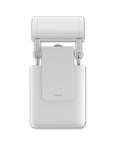
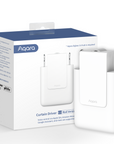
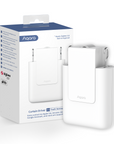
Curtain Driver E1
Grab a bundle & explore our kits!
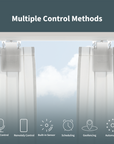
Multiple Control Methods
After setting the guidance in the Aqara Home app, you will be able to control your curtains when you are away from home, or by voice commands with Siri, Alexa, or Google Assistant. Additionally, the built-in light sensor allows the Curtain Driver E1 to be controlled automatically based on the actual brightness. If it's too bright outside, the curtains will close by themselves.
Smart Home Automations
The Aqara Curtain Motor E1 can help you to enjoy automated control of your existing curtains based on weather, time, lighting conditions or other Aqara devices triggered. You will be able to set a timer to customize a sleep-wake routine that perfectly fits your personal schedule. Automations via HomeKit, Alexa, Google Home and IFTTT are supported.
Powerful Motor
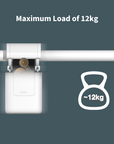
Thanks to its powerful motor, the maximum load of the Curtain Motor E1 can reach up to 26.4 pounds. You can choose between one or two motors per window. In the case of installing two, they will be able to be grouped together so that you can open the curtains simultaneously. Moreover, the speed of the motor can be adjusted to three levels, so it will work more quietly and open the curtain slowly to make waking up more pleasant.
Long Battery Life
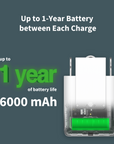
A huge 6000 mAh rechargeable battery may last for up to a year without charging. (The calculated battery life refers to opening and closing a curtain on a 5 ft track (i.e., 2 curtain drivers per window) once a day, and it also depends on friction, curtain weight and type.) Moreover, the device can be charged via the Type-C using either a powerbank or a power supply (both not included).
 Aqara
Aqara
 Apple Home
 Alexa
Alexa
 Google Home
 IFTTT
IFTTT

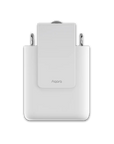
Curtain Driver E1
Easy-to-use Yet Powerful Smart Curtain Controller.

Features

Support Majority of Curtains
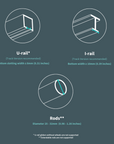
Choose the rod version or the track version for compatible U- or I-rails. Check the rail shape, dimensions and required accessories before selecting a version.* **

Built-in Light Sensor
The built-in light sensor allows the Curtain Driver to be controlled based on brightness: save the energy on cooling and keep your eyes in a better comfort.

Wide Ecosystem Support
Supported platforms and assistants connect through a compatible Aqara hub. Matter support depends on the hub, device type and integration.

Up to 1-Year Battery Life between Each Charge***
You can choose from the huge 6000 mAh rechargeable battery for using up to a year or even powering it constantly by USB-C port.

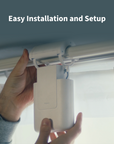
Easy Installation and Setup
Just simply mount the Curtain Driver E1 onto the existing curtain track and finish installation on the Aqara Home app.

Zigbee 3.0 Protocol
Zigbee, the most stable and reliable smart home technology, is used to support automations and cloud integrations.

Multiple Control and Automations
Use an Aqara switch as a physical controller, or control the curtains by schedules, sunrise/sunset, weather, geofencing, and other customized automations.

Maximum Load of 12 kg
The powerful motor allows the Curtain Driver E1 to push and pull a maximum of 12 kilograms, which will likely support curtains made of all materials.
* Extendable rods are not supported.
** Rod version supports Rods, U-Rails and I-Rails; Track version supports U-Rails and I-Rails.
*** The actual battery life may vary depending on curtain weight, track length, and friction.
Wide Compatibility
The Curtain Driver E1 is compatible with a wide range of smart home ecosystems and voice assistants.
Supports Apple HomeKit, Amazon Alexa, Google Assistant and IFTTT through a compatible Aqara hub. Matter bridging depends on the hub model and firmware.
*Check Aqara hub, firmware and target-platform compatibility for Matter bridging.

Design to Fits for Popular Curtain Track You Would Probably Use

** U-rail gliders without wheels are not supported.
** Extendable rods are not supported.
** See instructions for more installation requirements of each track.

Installation Requirements (Rod Version)

Multiple Control Methods for Any Occasion
By a built-in or external illuminations sensor
The Curtain Driver can also be controlled automatically by the brightness level, or by temperature, motion or other events detected by a wide variety of Aqara sensors.

By voice command
Apple's Siri, Amazon Alexa and Google Assistant are supported. Choose from the most popular voice assistant that you like to control the Curtain Driver E1 easily by your voice command.

By an action or event
Control could be achieved by only one touch: By pulling the curtain slightly, pressing the Aqara Mini Switch, turning once the Aqara cube controller, and more for you to explore.

By time or other app setting
The Aqara Home app also has a powerful scheduling function including days of the week, holidays, monthly and yearly repetitions, geofencing, as well as sunrise and sunset.

Easy Installation and Usage
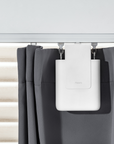
No tools are needed. Just mount the Curtain Driver E1 onto the existing curtain rails and hide it behind the curtain, then follow the guidance and finish the setup on Aqara Home app.

Easy Installation and Usage
The cutting-edge energy-saving technologies and the huge 6000mAh battery are chargeable to last for up to a year.* The most modern and versatile Type-C port is used for charging or even powering the device constantly.**
* The actual battery life may vary depending on curtain weight, track length, and friction.
**constant powering requires the cable to be placed freely to prevent it from being tangled.

Compact Yet Powerful
The E1 supports curtains up to 12 kg on compatible rods and U-rails, and about 8 kg on I-rails. Actual performance depends on rail condition and friction.

Install Two Curtain Drivers on One Window
To increase the battery life and opening speed, you can combine two Curtain Drivers per one window, so that each side of the window will be either controlled individually or synchronized with another one!

IF it is 9 am
THEN the curtains will open slowly right before you wake up in order to make your mornings more pleasant
IF the sun is too bright
THEN the curtains will partially close
IF the sun is about to set
THEN the curtains will open right before the sunset so you can enjoy the view


The curtains will close when you go to bed
IF your going to bed action triggered by motion sensor
THEN the curtains will close to help you sleep more comfortably


Specifications


FAQ
1.What kind of curtain rail does the Curtain Driver E1 (Track Version) support?
U-rail, requirements: Bottom slot width ≤ 8 mm, and the bottom surface should be kept flat with no protrusions. I-rail, requirements: Bottom width ≥ 10 mm, and the bottom surface should be kept flat with no protrusions and the circular arc bottom surface is not supported. Caution: There must be no protrusions or steps on the rail caused by installing connecting devices.
2.What kind of curtain rail does the Curtain Driver E1 (Rod Version) support?
The curtain driver of the rod version supports rods with a diameter of 25–32 mm and a smooth surface, and extendable telescopic rods are not supported. Types of curtains: Compatible with grommet curtains and ring top curtains. Please note: The main unit of the Curtain Driver E1 (Rod Version) can also support U- and I-Rails. In this case, for the installation process and compatibility please refer to the user manual or installation video of the Curtain Driver E1 (Track Version). However, fot better performance and compatibility with I-Rails, we suggest using Curtain Driver E1 (Track Version) as it has I-Rail accessories included.
3.What is the maximum bearing capacity for the curtain driver?
The maximum bearing capacity is 12 kg with U-rails and rods, and about 8 kg with I-rails. The actual bearing capacity will be affected by factors such as wear of curtain rings, aging of rails and dirtiness.
4.Why can't the curtains be fully opened or closed after the curtain driver is hung on the rail and clasped?
After the curtain driver is hung on the rail and clasped, it is necessary to set the route for it via the Aqara Home app or with the button on it.
5.How can I determine that the curtain driver has been clasped in place?
After the curtain driver is clasped in place, the buzzer will beep twice. When you view from the side, the body of the curtain driver should be perpendicular to the bottom of the guide rail, and the drive wheel should not be stuck in the U-rail groove. You may shake the curtains gently by hand. If the position and posture of the curtains can't be changed easily, it shows that the curtain driver is clasped in place.
6.What if the curtains don't open and close automatically when I pull them manually?
Check whether the "Open/close curtains manually" function of the curtains has been enabled on the Aqara Home app. Then try to pull the curtain driver in the opposite direction for a distance (about 10 cm) and try again.If you feel it's hard to pull the curtains by hand, you can pull the second or third fold of the curtains.
7.How can I reset the curtain driver?
Press and hold the Set button for 5 seconds, and release it until the indicator blinks orange rapidly and the buzzer beeps. Then, the indicator keeps blinking orange rapidly, which indicates that the curtain driver has been reset successfully.
8.Why does the curtain driver stop before running to the ending point?
This may happen due to any of the following reasons: The fully charged curtain driver will deviate from the original route if reinstalled, and it is necessary to set the route for the curtain driver again; The curtain driver is not fully clasped in place (the drive wheel is not fully attached to the guide rail); Please confirm whether there is any foreign object on the curtain rail; Please reset the route for the curtain driver in the Aqara Home app and try again; The curtain driver has insufficient power; Please make sure that there are no protrusions or steps on the rail caused by installing connecting devices; Please make sure that the hanging rings of the curtain driver are in normal condition, and there is no deformation caused by poor-quality materials, such as the rings being pulled apart.
9.Can I pull the curtains directly by hand to stop them halfway while the curtain driver is running?
Forcefully pulling may stop the curtain but can damage it because of the motor force. Use the app or an appropriate control to stop movement, and recalibrate the travel limits if the stopping position changes.
10.Is it normal for the curtain driver to rebound after running to the ending point?
Yes, it is normal.
11.The curtains are actually closed after performing the "open" action; while they are open after performing the "close" action. How can I adjust them in this situation?
Go to the device page in the Aqara Home app, click in the top right corner to enter Settings > More settings > Curtain basic settings > Adjust the opening/closing direction of the curtain to make adjustments.
12.The opening direction of the curtain is opposite to the actual opening direction. How can I adjust when the left and right opening directions are different from the settings on the app?
Go to the plug-in in the Aqara Home app, tap in the top right corner to enter Settings > More settings > Curtain basic settings > Curtain style to select Curtain open to the left or Curtain open to the right.
13.Does the curtain driver need to be used with a gateway device?
Yes, a hub with zigbee 3.0 function is needed.
14.Why doesn't the “Ambient light triggered smart connection” function in the app work after I set it?
Please make sure that the curtain driver is not blocked by walls, pelmets and other objects, and it will work only after the sensor is exposed to strong light. Note: The ambient light triggered smart connection will only work after the timer and the illumination intensity have been met simultaneously. If it is mainly for scheduled opening and closing of the curtains, you are recommended to use the timer function in automation directly.
15.Can I set the ambient light triggered smart connection after creating a curtain driver group?
There is no option to directly set the ambient light triggered smart connection on the setting page of the curtain driver group, but it is possible to set the function on the setting page of the individual curtain driver device page.
16.Why does the indicator of the curtain driver blink red or stay red?
This happens when the internal temperature of the curtain driver is beyond the normal working range.In this case, you need to remove the curtain driver from the curtain rail. If charging is in progress, please disconnect the charging cable and stop charging, and then use it after the temperature returns to normal.
17.What if the rings at my home are too fragile and pulled apart?
Please purchase high-quality gliders.
18.Why isn't the curtain completely closed when the curtain driver has run to the ending point?
Please check whether the curtains are blocked by other obstacles or dragged to the ground. You will be unable to close the curtains completely in the two cases.
19.Why doesn't the curtain driver move while its drive wheel is running after it is hung on the rail?
Check that the driver is securely installed and the drive wheel contacts the rail. Inspect the rings and fixings and replace damaged parts. Confirm that the curtain style selected in the app matches the installation.
20. How long is the battery life of the Curtain Driver E1?
Given the situation where the length of the track/rod is 1.5m, the weight of the curtain is 12kg, and the device is sheduled to open and close the curtain once a day, the curtain driver can run for around 9 - 10 month. PS: the battery life can be influnced by the friction between the curtain and the track.