




Door and Window Sensor P2
Grab a bundle & explore our kits!
[Open/Closed Status Monitoring] With a built-in high-precision Hall sensor, the Aqara Door and Window Sensor P2 can detect the opening and closing status of doors, windows, and drawers precisely. Once the sensor is triggered, it will send real-time alert notifications to your smartphone whether you're at home or away, ensuring you're always aware of any potential security concerns. (*Note: the functionality such as automation conditions may vary throughout the different ecosystems.)
[Local Home Automations] You can integrate the Door and Window Sensor P2 with your smart home ecosystem to enable advanced automations like adjusting thermostat settings or activating security cameras when a door or window is opened. Moreover, the automations are executed without the cloud, which can protect the user’s privacy and will keep working even if there is no internet connection.
[Voice Alerts and Status Notifications] The Aqara Door and Window Sensor P2 supports Apple Siri, Alexa, and Google Assistant. With these voice assistants, you can receive alerts about events such as door entries, or ask whether a door is open, allowing you to effortlessly monitor your home.
[Matter Compatibility] A Matter Controller & Thread Border Router 2-in-1 is required to enjoy seamless integration with a Matter-enabled smart home ecosystem. Currently, the following hubs are tested, but new hubs will be added over time. Apple: Apple TV 4K (3rd gen, 128 GB), Apple TV 4K (2nd gen), HomePod (2nd gen), HomePod mini | Samsung: SmartThings Hub v3, Aeotec Hub v3, SmartThings Station | Amazon: Echo (4th gen) | Google: Nest Hub (2nd gen), Nest Hub Max, Nest Wi-Fi Pro.
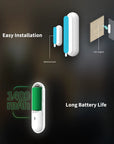
[Easy Installation & Long Battery Life] With its compact design and adhesive back, the sensor is easily integrated into any interior. Additionally, equipped with a powerful CR123A battery, it provides uninterrupted protection with infrequent replacements.* The battery life may vary depending on the border router and Matter app the sensor is connected to. For best results, the future Aqara border router is advised.
 Aqara
Aqara
 Apple Home
 Alexa
Alexa
 Google Home
 SmartThings

Door and Window Sensor P2
When the iconic sensor meets Matter support.Please note:
A Matter-compatible Thread Border Router is required. Aqara Home integration requires a compatible hub such as Hub M3.

Features

Native Matter Support
Allowing the direct connection to platforms including Apple Home, Google Home, Amazon Alexa and more.

Build upon Thread Protocol
Providing robust, low-latency, and mesh-capable communication with the Thread protocol.

Local Home Automations
Seamless integration with smart home ecosystems of your choice without relying on cloud services.

Local and Remote Alarm
Get real-time alerts on your smartphone when the sensor is triggered, no matter where you are.

Easy and Flexible Installation
The sensor is easy to install with its strong sticker. Also, an alternative thin magnet plate is included for flexibility.

Future-Proofing via OTA
Additional functions such as tamper alerts, adjustable sensitivity and a programmable button depend on available device and platform updates. Check the functions currently available in your device settings.*
*Aqara Home integration requires a compatible hub such as Hub M3. **Use with a Matter platform requires a compatible Matter controller and Thread Border Router; one device may provide both functions.
Entering the Matter Era
Matter provides a more cohesive, unified smart home experience for users. It simplifies the process of setting up and managing devices and allows seamless interoperability across smart home devices and platforms.

The P2 supports Matter over Thread for platforms such as Apple Home, Google Home, Alexa and SmartThings, or Aqara Home through a suitable hub such as M3. Supported local automations can run on your home network.

* The functionality such as automation conditions may vary throughout the different ecosystems

Minimum Requirement: 2-in-1 Matter Controller & Thread Border Router
A growing number of Thread Border Routers with Matter controller functionality are tested:

Using a Matter controller and a separate Border Router
In case you already have a 2-in-1 Matter Controller & Thread Border Router, but want to connect the device to an additional app, you can just add a more common and affordable Matter Controller to your setup:

Achieving the best functionality and Aqara Home support: Aqara Hub M3
Aqara Matter-over-Thread devices can be added to Aqara Home using a suitable hub such as Hub M3. Additional settings and functions depend on the device and firmware; check the options available in the app.


Always-on Open/Close Detection for Your Ease of Mind
Phone notifications can help you follow changes in the sensor state at home or away, subject to connectivity and alert settings.


Maximizing Efficiency with Voice Assistants
Using the supported voice assistants, you can receive alerts about events such as door entries, or ask about whether a door is open, keeping you on top of things at home.
* The functionality such as automation conditions may vary throughout the different ecosystems

Easy Installation
With its compact design and adhesive back, the sensor easily integrated into any interior. The upgraded stickers will not leave traces after being removed, and the additional flat magnet brings more installation flexibility.

Long Battery Life
Additionally, it is equipped with a powerful CR123A battery, it provides uninterrupted protection with infrequent battery changes.
* The battery life may vary depending on the Thread Border Router and the Matter-enabled app(s) the sensor is connected to. For best results, Aqara border router is advised

Achieving the best functionality and Aqara Home support: Aqara Hub M3

IF Door and Window Sensor P2 is opened (i.e. the toilet cover was opened, which indicates that the toilet is used)
THEN Deactivate the automation “Turn off the light if no motion was detected for 2 minutes”


Specifications


FAQ
How do I install the Aqara Door and Window Sensor P2? Can the sensor body and the magnet part be swapped from side to side?
1. align the mounting mark lines of the main body and the magnet as shown in the instruction manual, mounting one on the fixed side of the door or window and the other on the opening and closing side (it is recommended that the main body be mounted on the fixed side); 2. the distance between the main body and the magnet should be less than 20 mm; 3. can be swapped from side to side, but must ensure that the mounting marks of the main body and the magnet are aligned ; 4. due to the complex indoor environment, adjusting the relative positions of the hub and the door and window sensors allows for a better communication environment; 5. the door and window sensor body should not be mounted on the metal part of the door or window due to the attenuating effect of metal on the wireless signal.
How do I install the door and frame not on the same level?
Turn the magnet orientation by 90 degrees. It is best to mount the sensor body on a door frame that does not move and the magnet on the door to better protect the sensor. The distance between the sensor body and the magnet is less than 20 mm, but at the same time they must not be mounted too close together to avoid contact and damage from collisions.
How far is the Aqara Door and Window Sensor P2 from the hub in order to communicate properly?
In complex indoor environments where there are walls separating the door and window sensors from the hub, the distance between the two needs to be reduced accordingly to achieve better communication.
What is the reason for the connection failure of the Aqara Door and Window Sensor P2?
Possible causes: 1. incorrect operation, re-add the device according to how it was added; 2. too far from the hub, move the device closer to the hub and re-add the device; 3. the hub's exceeded the sub-device load.
Why is the Aqara Door and Window Sensor P2 often offline?
Possible causes: 1. the device is far from the hub, verify the distance between the sensor and the hub and install the device close to the hub; 2. low or dead batteries, replace with new batteries; 3. the sensor subject is mounted on a metal surface and the signal is receiving interference.
What are the functions of the Aqara Door and Window Sensor P2?
1. The Aqara Door and Window Sensor P2 can be installed on a door or window to sense the opening and closing status of the door or window in real time; 2. It can be used with other smart devices to link up and control the opening or closing of the device when the door or window is sensed; 3. the Aqara Door and Window Sensor P2 is integrated into the Matter ecosystem, allowing for multi-platform and multi-ecological interoperability.
How do I reset the Aqara Window and Door Sensor P2?
Click the key 10 times quickly and continuously, the indicator light breathing status blinks to indicate that the device is restored to the factory settings.
What platforms can the Aqara Window and Door Sensor P2 access now?
Currently connected to Aqara Home, Apple Home, Google, Alexa, Samsung platforms.