


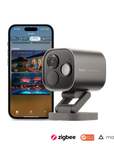
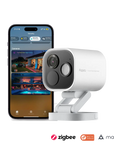





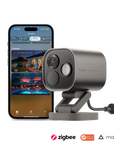
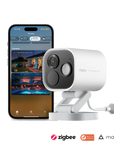


Camera Hub G5 Pro
Grab a bundle & explore our kits!
AI-Powered Detection: With built-in AI, the G5 Pro detects faces, vehicles, and sounds like alarms and baby cries, providing smarter, more reliable security with local automations even during internet outages.
True Color Night Vision: Featuring a graphene-cooled sensor and advanced True Color Night Vision, the G5 Pro delivers superior 2.6K resolution, brighter images, and detailed visuals even in low-light conditions.
Seamless Smart Home Integration: Supports Zigbee, Thread, and Matter, making it compatible with major platforms like Apple Home, Alexa, and Google Home, creating a smooth and connected smart home experience.
Privacy with Apple HomeKit Secure Video: Ensures complete privacy with End-to-End encryption, with no video stored on the cloud, and all footage analyzed locally.
Flexible Connectivity: Available in PoE and dual-band Wi-Fi versions, offering stable connectivity and power options for various setups, including flexible streaming and storage solutions.
Additional Features:
- Advanced Outdoor Monitoring: With a 100 dB speaker, two-way audio, and customizable alerts, the G5 Pro enables effective communication and deterrence.
- Durable Design: IP65-rated housing for both indoor and outdoor use, capable of withstanding extreme weather conditions.
- Secure Local Storage: Offers encrypted eMMC storage with NAS support, ensuring your surveillance footage remains safe and accessible.
 Aqara
Aqara
 Apple Home
 Alexa
Alexa
 Google Home
 SmartThings
 IFTTT
IFTTT
 Home Assistant

Camera Hub G5 Pro
Clearly capturing the unexpected, day and night


Aqara’s First Outdoor Camera Hub
The G5 Pro is an outdoor camera and Zigbee/Thread hub that connects Aqara and other smart devices, also serving as a Matter controller for easy integration with other ecosystems.

7-in-1 Visual AI & 4-in-1 Audio AI
The built-in NPU enables both Visual and Audio AI for smarter detection.

True Full-Color Night Vision
The G5 features 4MP (1520p) resolution, True Color Night Vision, and a built-in spotlight for clearer, more detailed night-time security.

Enhanced Privacy Protection
Compatible with HomeKit Secure Video, with encrypted local storage and end-to-end encryption for both Aqara and Apple cloud footage.

Wi-Fi or Ethernet for Connectivity
Choose the PoE version for wired Ethernet or the Wi-Fi version for wireless connectivity. Dual-band Wi-Fi and WPA3 apply to the Wi-Fi version; network hardware differs by version.

Reliable in Extreme Cold
With an IP65 rating for water and dust resistance, the G5 Pro operates even in temperatures as low as -30°C (-22°F).

Network Storage and Streaming
Supports RTSP for local streaming and SMB NAS for expanded storage, plus streaming to Alexa, Google, and Samsung smart displays.

Flexible Installation
The rotatable stand allows installation on walls, ceilings, or flat surfaces, with optional 1/4" screw compatibility.
The First Aqara Outdoor Camera Hub
The G5 Pro is more than just a camera: it expands your smart home setup outdoors with built-in Zigbee and Thread hub functionality. It also grants Thread support to smart home hubs of other brands and bridges connected Aqara devices to Matter ecosystems.

Locally Hosted 7-in-1 Visual Al+ 4-in-1 Audio Al
The G5's Al recognizes faces, individual vehicles, people, and animals as they come into view. lt identifies lingering individuals, detects lens obstruction, and notices delivered packages. You can configure these detectionsto trigger alerts, initiate recordings, or prompt camera responses.


The Convenience of Wi-Fi or the Stability of Ethernet Connection
The G5 Pro (PoE) uses an Ethernet port for both data and power (USB-C optional), providing a highly stable, reliable connection. The G5 Wi-Fi version is powered by USB-C, secured with WPA3, and transmits data via dual-band 2.4/5GHz Wi-Fi for a more flexible setup.
Premium True Full color Night Vision
The G5 features a graphene-cooled 1/1.8" sensor with True Color Night vision, 4MP 2.6K resolution, 133° field of view, f/1.0 aperture for enhanced light capture, and a built-in spotlight for security automations.

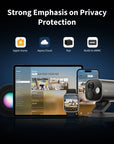
Strong Emphasis on Privacy Protection
The G5 Pro is compatible with Homekit Secure Video, features encrypted local eMMC storage, and for the first time, supports end-to-end encryption of the footage sent to both Apple and Aqara clouds, bringing data security to a whole new level.

Reliable in Extremely Cold Environments
The G5 Pro is rated IP65 for water and dust protection, with an operating range of -30 to +50°C. Observe temperature, humidity and connection-sealing requirements when installing outdoors.


Network Storage and Streaming Support
RTSP (Real-Time Streaming Protocol) allows local video streaming to video server software such as Frigate and Blue lris, while SMB NAS support expands local storage options. And for more flexibility, the G5 Pro can stream to Alexa, Google and Samsung smart displays and TVs.
Multiple Installation Methods
Placement is highly customized, and can conform to nearly all spaces indoor and out. The G5's rotatable stand can be installed on nearly all flat surfaces, walls, and ceilings.


IF Unknown person detected in your yard
THEN Activate Spotlight, full brightness. Trigger custom ringtone "Intruder
detected, you are being recorded" turn on kitchen + living room lights

IF Your car is detected
THEN Open the garage door
Specifications


FAQ
Does the camera support generating black-and-white night vision images using infrared illumination?
This product only supports full-color night vision and does not support black-and-white night vision mode through infrared fill light. When deployed in a completely dark environment, please turn on the visible light fill light.
When do I need to turn on filling lights?
This product can still output color images under extremely low illumination, but the lower the illumination, the lower the video frame rate will become, the more image noise will increase, and the image quality will deteriorate, which will affect the AI recognition accuracy and the identification of image details. When the above situation occurs, please start the fill light according to actual needs and adjust it to the appropriate brightness to improve image quality.
Can the AI recognition function still be used at night or in low-light environments?
Without the fill light, the minimum illumination for the camera to enable AI recognition is 0.25 Lux. Below this illumination, the recognition rate will drop sharply. At the same time, the AI recognition distance under low illumination will be significantly shorter than that during the day. It is recommended to turn on the spotlight at night or in a poorly-lit environment and adjust the brightness to 100% to improve the AI recognition.
Why can't I connect to the camera's video using a third-party client after the RTSP function is enabled?
1. After restoring the device to factory settings, the RTSP username and password will change. Please reconfigure the username and password for the connection on the third-party client. 2. The router IP address obtained by the camera through DHCP has changed. Please reconfigure the IP address for the connection on the third-party client. 3. The third-party client and the camera are not in the same LAN. Please make sure that the two are connected in the LAN of the same IP network segment.
What networking methods does the device support?
The Wi-Fi version supports 2.4 and 5 GHz Wi-Fi. The PoE version uses Ethernet; check the selected model before purchase and installation.
How many child devices can the camera support?
This product can support the access of Zigbee devices and Thread devices at the same time. The upper limit of Zigbee devices is 127, while the number of Thread devices is not limited for the time being. However, for a better user experience, we recommend that the gateway only connect to child devices of the same protocol. If child devices of two protocols are connected at the same time, we recommend that the total number of devices does not exceed 40.
Why does the PIR detection performance decrease significantly when the camera is installed outdoors?
In outdoor environments (especially in summer in low-latitude areas), the difference between Person infrared thermal radiation and natural thermal radiation in the environment is small, which makes the PIR sensor insensitive and significantly reduces the accuracy and distance of Person detection. It is recommended to turn on this function when used indoors, and turn on the Person detection function instead when used outdoors.
What does the Anti-Theft Lock do?
When the Anti-Theft Lock function is enabled, users will not be able to unbind the device from the account by quickly pressing the device function key 10 times. The device owner must delete the device from the App before it can be bound to another account again. This can prevent the device from being stolen and still being used illegally.
How is the vehicle detection function used?
After enabling the vehicle recognition function, the camera can detect whether there is a vehicle in the picture. When the vehicle picture captured by the camera is marked from the vehicle library of the App, the function of identifying the designated vehicle can also be realized. The vehicle recognition can determine whether it is the target vehicle by matching the shape, color and other characteristics of the vehicle (recognition that not based on plates may lead to false recognition). In this way, the automatic linkage function when the designated vehicle appears can be configured. At the same time, the vehicle detection function can also detect whether the vehicle is approaching or away from the camera, so as to control the switch of the garage door
How to improve the accuracy of identifying specific vehicles?
1. According to the App's instructions, install the camera in the correct position to ensure that the camera can capture a large enough surface area of the vehicle; 2. Turning on the fill light in a low-light environment can effectively improve the accuracy of vehicle recognition; 3. Since vehicle recognition is achieved through the appearance and color matching results of the vehicle, there is a certain probability of mismatching (for example, when the same model appears in the picture at the same time). By making special marks on the appearance and color of the specified vehicle (such as adding a personalized logo, affixing a personalized car cover color, etc.), it can effectively distinguish other vehicles of the same model.
What kind of environment can this product be used in?
The outdoor protection grade of this product complies with the IP65 specification and can work in indoor and outdoor environments with a temperature range of -30℃~+50℃ and a humidity of 0%~95% without condensation.
How can I ensure that my camera is waterproof?
When restoring the camera to factory settings, you need to open the tail screw and remove the back cover before pressing the setting button. After pressing the button, be sure to install the back cover in the correct direction and tighten the screws to ensure that the back cover and the product body are well sealed.
Is continuous 24/7 recording available?
Continuous recording and NAS options depend on firmware and app settings. Update the camera and check the options available for your model; do not rely on future features before they are available.
Does the camera support plugging in an external TF card? How to expand the local storage space?
The camera uses built-in eMMC storage and does not accept a microSD card. Capacity varies by model; check the selected model. A compatible NAS can provide additional supported recording storage options.
After enabling AI detection boxes, which target types do the different colored boxes represent?
Red - person detected Green - package detected Cyan (light blue) - vehicle detected Blue - pet detected Yellow - face recognized
Why, after turning on the AI detection function, the camera still does not push any detection message and record event video when a person or vehicle appears in the picture?
Please pay attention to the installation height and position of the camera. When the installation height is too high or the detected target in the camera video screen is very small, it does not meet the minimum target size requirement for AI detection. The camera will filter these detected targets, so the camera will not trigger any AI alarm events and record.
What is HomeGuardian?
Aqara HomeGuardian combines cameras and sensors with home-security software functions, including event logging, alerts and cloud storage options. Configurable modes adapt to occupancy and time of day. Availability, features, retention periods and subscriptions vary by region; check availability in Kuwait in the app.
Does G5 Pro support the Advanced Matter Bridging function?
Yes, the G5 Pro supports advanced Matter bridging, allowing Aqara-specific scenes and signals to synchronize with Matter-compatible ecosystems such as Home Assistant. To add Aqara or third-party Matter devices, you'll need a hub with a Matter controller, and the G5 Pro serves as one of these controllers. Aqara Home currently supports Matter device types including lights, thermostats, outlets, switches, buttons, and a wide range of sensors—such as presence, light, door/window, temperature, and humidity sensors—with support for additional device categories coming soon.
What networking methods does the Aqara Camera Hub G5 Pro support?
The G5 Pro Wi-Fi version connects over 2.4 or 5 GHz Wi-Fi. The G5 Pro PoE version connects over Ethernet. These are different models; do not assume the PoE model has Wi-Fi or that the Wi-Fi model has Ethernet.
What is the function of RTSP?
RTSP is a streaming protocol for audio and video that allows video integration with third-party devices and software on a local network. For example, this product can stream video via RTSP to NVRs, VLC players, and smart home platforms like Home Assistant. The RTSP username and password remain unchanged after a power cycle, but if the device is factory reset, the RTSP credentials will be reset as well, requiring you to reconfigure the connection in third-party clients.
If I want to use a third-party ecosystem, is it possible to directly bridge the child devices already controlled by the Aqara Camera Hub G5 Pro to the new ecosystem?
Compatible Aqara child devices can be shared with other ecosystems using the methods supported by the hub and target platform, such as Matter bridging. This does not automatically transfer every device or feature; follow the sharing steps in Aqara Home and the target platform.